
How to use the examples
A block beginning with \documentclass is a complete document. The remaining tex blocks are snippets to insert inside document, in a new figure, with \usepackage{noctiplots} in the preamble. This package also includes noctiks, so it works for all the examples. Signatures with descriptive names appear in text blocks and should not be copied literally.
For snippets, you can use this base document with Letter paper, 15 mm margins and canvases up to 520 bp wide. If you change the page size, check both the text area and the actual PDF size to avoid clipping.
\documentclass{article}
\usepackage[letterpaper,margin=15mm]{geometry}
\usepackage{noctiplots}
\setlength{\parindent}{0pt}
\begin{document}
\begin{center}
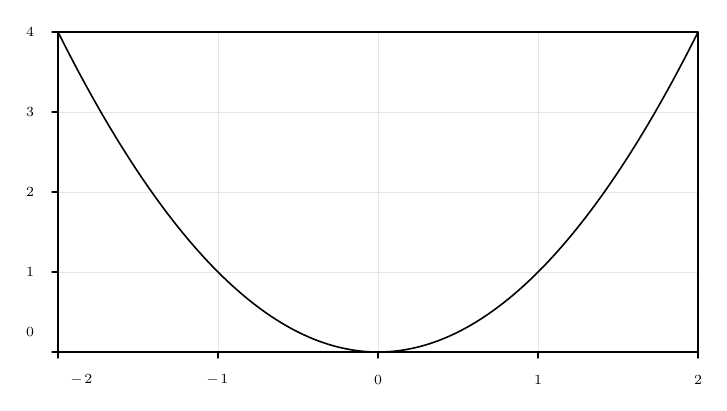
\begin{noctiaxis}[width=400,height=240][axes=box]
  \NoctiFunction[domain=-2:2]{x^2}
\end{noctiaxis}
\end{center}
\end{document}
The table examples show filecontents* together with the contents of each CSV. To work in Paper Studio, save those contents in a project data file with the name shown and keep the call to \NoctiTable or \NoctiScalarTable.
To try an alternative option, replace the value shown; you do not need to overlay every case in one figure. Deliberate errors are explained in the prose and are not included in the compilable code blocks.
Notation and units
Noctiks creates 2D plots and diagrams with editable LaTeX text. Load noctiks for diagrams, or noctiplots to include scientific plots as well. Compile the document in Paper Studio to update the PDF.
\documentclass{article}
\usepackage[letterpaper,margin=15mm]{geometry}
\usepackage{noctiplots}
\setlength{\parindent}{0pt}
\begin{document}
\begin{figure}[htbp]
\centering
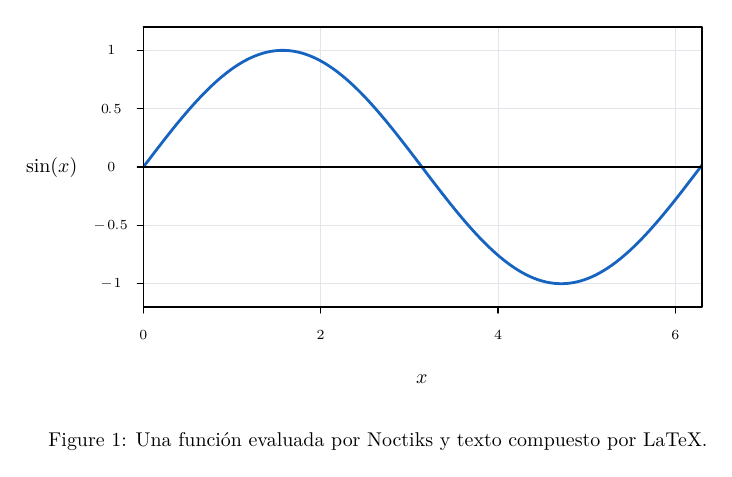
\begin{noctiaxis}[width=360,height=220]
  [axes=origin-box,xmin=0,xmax=6.3,ymin=-1.2,ymax=1.2]
  \NoctiFunction[domain=0:6.3,stroke=blue,width=1.4]{sin(x)}
  \NoctiXLabel{$x$}
  \NoctiYLabel{$\sin(x)$}
\end{noctiaxis}
\caption{Una función evaluada por Noctiks y texto compuesto por LaTeX.}
\end{figure}
\end{document}
Options are written as clave=valor and separated by commas. An unknown, duplicate or malformed key without = causes an error. Names are case-sensitive. Do not assume that a key accepted by one command is accepted by another: each family has its own list. In noctiaxis, the first optional argument configures the canvas; the second configures the axes. In noctipanels, the first configures the canvas and the second the panel grid.
| Notation | Meaning | Example |
|---|---|---|
x,y |
Pair of coordinates or components | 2,3 |
x1,y1;x2,y2;... |
List of points | 0,0;1,2;2,1 |
a:b |
Increasing interval where required by the command | 0:2*pi |
r:g:b |
RGB colour with components between 0 and 1 | 0.2:0.4:0.8 |
d1:d2:... |
Dash and gap sequence | 5:3 |
a -> b -> c |
Node list in semantic commands that accept one | input -> G -> output |
bp |
PDF point: 1/72 of an inch | width=360 gives a 5-inch-wide canvas |
| Data unit | Unit of the values being plotted | barwidth=0.5 is a width in X, not 0.5 bp |
Diagram coordinates are measured in bp from the bottom-left corner, with Y increasing upwards. Plot coordinates are data values transformed by their scales. Line widths, symbols, spacing and typographic measurements use bp unless a table specifies another unit. Numbers use a decimal point; scientific notation is supported, such as 1.2e-4. Do not include units in numerical values: width=360, not width=360bp.
Coordinates and numerical options must be finite and have an absolute value no greater than 1e12; individual parameters may impose tighter limits. Canvas dimensions are in (0,2000] bp. Scientific constants may exceed 1e12, but using one as a coordinate subjects it to the graphical limit again.
Label text in braces supports LaTeX and mathematics. Formulae evaluated by Noctiks use its own numerical grammar. For example, a label may be $\sin(x)$, whereas a curve formula is sin(x).
Noctiks reserves a box of the declared size. LaTeX determines its position on the page; figure and \centering can centre it. Extending a function domain does not automatically change an explicit axis range, and changing the visible range does not alter the evaluation domain.
Mathematical expressions
The evaluator accepts Double numbers, the built-in constants pi and e, user-declared constants and the operations in this table. Functions take one argument; angles are in radians.
| Operator or function | Meaning and real-valued domain | Valid example |
|---|---|---|
+, - |
Addition, subtraction and unary signs | x+2, -x |
*, / |
Explicit multiplication and division; the divisor must be non-zero for a finite result | 2*x, x/3 |
^ |
Power; must produce a finite real result at each usable evaluation point | x^2, 2^(-x) |
(...) |
Grouping | (x+1)/(x+2) |
sin(...) |
Sine | sin(x) |
cos(...) |
Cosine | cos(2*x) |
tan(...) |
Tangent; has singularities | tan(x) |
asin(...) |
Arcsine, argument in [-1,1] |
asin(x/2) |
acos(...) |
Arccosine, argument in [-1,1] |
acos(x/2) |
atan(...) |
Arctangent | atan(x) |
exp(...) |
Base-e exponential | exp(-x) |
ln(...), log(...) |
Natural logarithm, positive argument; these are equivalent | ln(x), log(x) |
log10(...) |
Base-10 logarithm, positive argument | log10(x) |
sqrt(...) |
Square root, non-negative argument | sqrt(x) |
abs(...) |
Absolute value | abs(x) |
pi, e |
Built-in mathematical constants | sin(pi/2), ln(e) |
Grouping and functions are evaluated first, followed by powers, unary signs, multiplication/division and addition/subtraction. Exponentiation is right-associative: 2^3^2 means 2^(3^2). -2^2 equals -4; (-2)^2 equals 4. Signs may appear in exponents: 2^-2 equals 0.25.
| Family | Supported variables | Use case |
|---|---|---|
| Cartesian function, function pieces, band, fill and integral | x |
sin(x) |
| Parametric or polar curve | t |
cos(t), 1+0.2*sin(3*t) |
| Vector or scalar field and trajectory equations | x, y |
-y, x, x^2+y^2 |
| Constant definition and scalar configuration | No free variables | 2*pi, masa/gravedad |
Explicit multiplication is required: 2*x, a*b and sin(x) are valid; 2x, ab as an implicit product and \sin(x) as a numerical formula are not. ab is interpreted as a complete constant name. There are no conditionals, comparisons, functions with multiple arguments, factorials, matrices, complex numbers, automatic units or user-defined functions. To define a function over separate intervals, use \NoctiFunctionPiece.
\documentclass{article}
\usepackage[letterpaper,margin=15mm]{geometry}
\usepackage{noctiplots}
\setlength{\parindent}{0pt}
\begin{document}
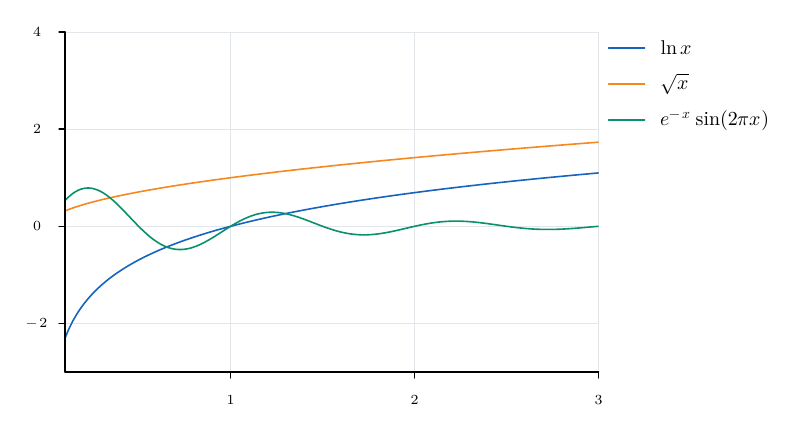
\begin{noctiaxis}[width=420,height=250]
  [xmin=0.1,xmax=3,ymin=-3,ymax=4,palette=scientific]
  \NoctiFunction[domain=0.1:3]{ln(x)}
  \NoctiFunction[domain=0.1:3]{sqrt(x)}
  \NoctiFunction[domain=0.1:3]{exp(-x)*sin(2*pi*x)}
  \NoctiLegend{$\ln x$}
  \NoctiLegend{$\sqrt{x}$}
  \NoctiLegend{$e^{-x}\sin(2\pi x)$}
\end{noctiaxis}
\end{document}
A syntactically valid formula may be undefined at some points. For curves, non-finite samples or samples beyond the graphical limit are separated by gaps and reported in diagnostics. This is not a mathematical proof of continuity; check singularities and choose an appropriate domain and sampling. For constants, any non-finite result or invalid mathematical domain causes an error, even if a later operation could conceal it.
The default limits are 2048 bytes and 256 grammar nodes per expression, with a depth of 64. Depth counts parser levels, not just parentheses.
Named constants and scope
Signature:
\NoctiConstant{nombre}{expresión escalar}
| Element | Rule | Example |
|---|---|---|
nombre |
Initial ASCII letter, followed by ASCII letters, digits or _; 1–64 bytes; case-sensitive |
masa_base, NA |
expresión escalar |
Finite number or expression without x, y, t; supports other constants |
68.1, masa/rozamiento |
| Reserved names | x, y, t, pi, e and the 12 function names above |
Use tiempo_final, not t |
| Definitions per scope | 256 effective names by default, including inherited names | A panel can override masa |
| Dependencies | Forward references supported; cycles prohibited; up to 64 levels | tau=masa/rozamiento |
Constants declared before the first figure belong to the document and are inherited. After the first figure, a declaration outside a figure is an error. Within a figure, the declaration is local to that figure; within noctipanel, it is local to the panel. In noctipanels, a declaration outside its panels belongs to the whole figure.
A local definition overrides an inherited one and recalculates inherited dependencies in that context. It does not affect other panels or the next figure. Two definitions of the same name in one scope are an error; they are not successive assignments. Declarations are collected before the contents are evaluated, so a local constant can configure the options of its enclosing axis.
Complete example with physical parameters, dependencies and a large scientific constant:
\documentclass{article}
\usepackage[letterpaper,margin=15mm]{geometry}
\usepackage{noctiplots}
\NoctiConstant{g}{9.8}
\NoctiConstant{masa}{68.1}
\NoctiConstant{rozamiento}{12.5}
\NoctiConstant{tau}{masa/rozamiento}
\NoctiConstant{velocidad_terminal}{g*masa/rozamiento}
\NoctiConstant{tiempo_final}{10*tau}
\NoctiConstant{NA}{6.02214076e23}
\NoctiConstant{cantidad}{1e-23}
\setlength{\parindent}{0pt}
\begin{document}
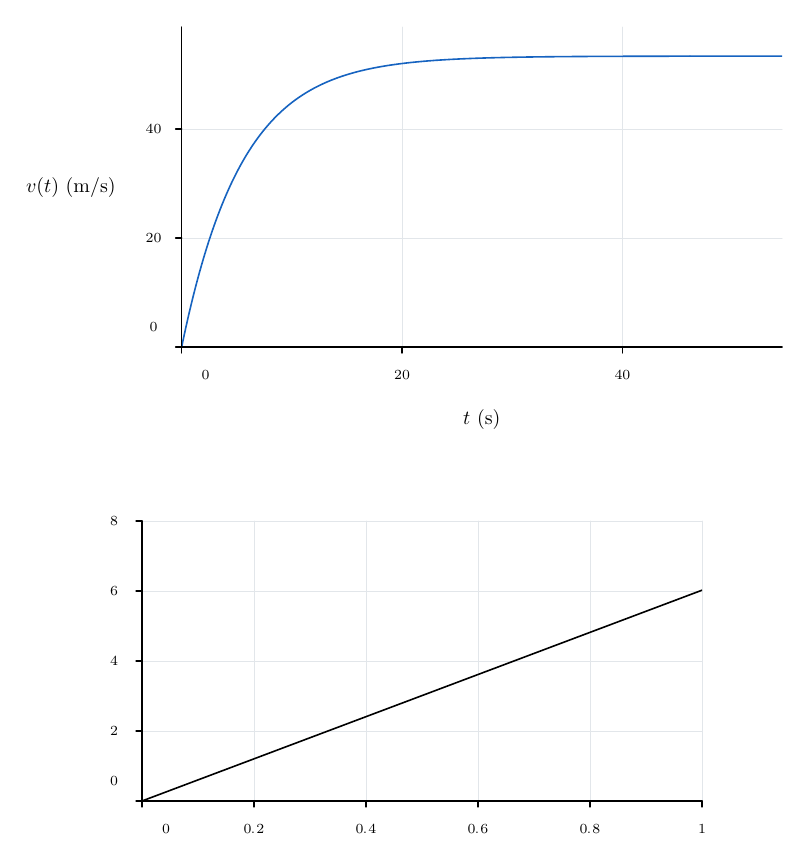
\begin{noctiaxis}[width=400,height=240]
  [xmin=0,xmax=tiempo_final,ymin=0,ymax=1.1*velocidad_terminal]
  \NoctiFunction[domain=0:tiempo_final,samples=301,stroke=blue]
    {velocidad_terminal*(1-exp(-x/tau))}
  \NoctiXLabel{$t$ (s)}
  \NoctiYLabel{$v(t)$ (m/s)}
\end{noctiaxis}
\par\medskip
\begin{noctiaxis}[width=360,height=220]
  [xmin=0,xmax=1,ymin=0,ymax=8]
  \NoctiFunction[domain=0:1]{NA*cantidad*x}
\end{noctiaxis}
\end{document}
Example of a panel-specific override and a local forward reference:
\documentclass{article}
\usepackage[letterpaper,margin=15mm]{geometry}
\usepackage{noctiplots}
\NoctiConstant{amplitud}{1}
\NoctiConstant{doble}{2*amplitud}
\setlength{\parindent}{0pt}
\begin{document}
\begin{noctipanels}[width=520,height=250]
  [rows=1,columns=2,share=both,xmin=0,xmax=6.3,ymin=-4.5,ymax=4.5]
  \begin{noctipanel}
    \NoctiFunction[domain=0:6.3]{doble*sin(x)}
    \NoctiTitle{Amplitud heredada}
  \end{noctipanel}
  \begin{noctipanel}
    \NoctiConstant{amplitud}{amplitud_local}
    \NoctiConstant{amplitud_local}{2}
    \NoctiFunction[domain=0:6.3]{doble*sin(x)}
    \NoctiTitle{Amplitud local}
  \end{noctipanel}
\end{noctipanels}
\end{document}
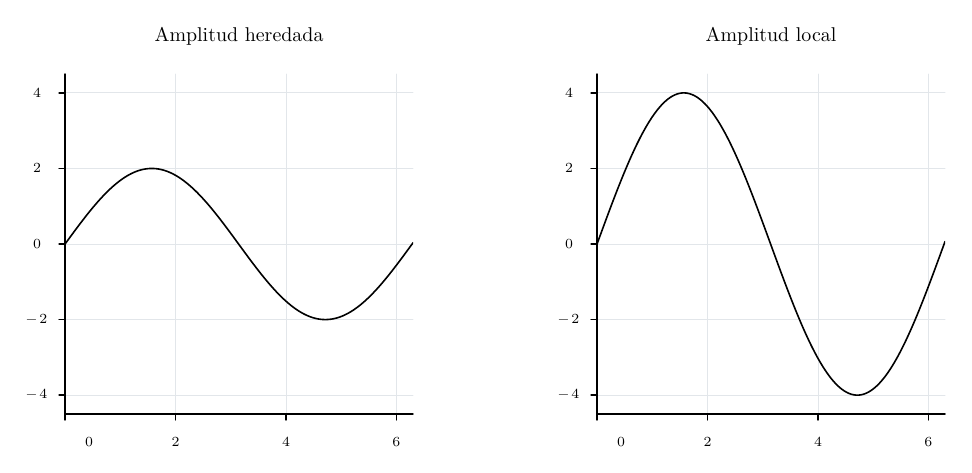
Shared limits are evaluated with the figure constants. A panel’s own limits are evaluated with that panel’s constants; if a limit is already shared, the panel must retain the same value. Each scope must be valid in its own right: a local override cannot rescue an invalid document definition.
These inputs support constants and scalar expressions while retaining each command’s individual restrictions:
| Input | Normalised fields | Example |
|---|---|---|
| Axes, panels and shared limits | xmin, xmax, ymin, ymax, xtickstep, ytickstep, ylabeldx, where the family accepts the key |
xmax=2*pi |
| Functions and curves | domain, samples, maxsamples, rangesamples, barwidth, where applicable |
samples=100+101 |
| Function pieces | Interval endpoints and formula | \NoctiFunctionPiece{0:pi}{sin(x)} |
| Fill and integral | domain, baseline, samples, n, depending on the command |
baseline=-amplitud |
| Bands | domain, samples |
domain=0:tiempo_final |
| Scalar field | xdomain, ydomain, nx, ny, levels, levelcount, zmin, zmax |
levels=0:amplitud:doble |
| Vector field | xdomain, ydomain, nx, ny, scale |
scale=1/2 |
| Trajectory and streamline | Seed, step, steps and formulae |
steps=10*50 |
| Explicit data | Coordinates and error magnitudes in NoctiPlot |
0,amplitud;pi,doble |
| Annotations | Coordinates for Point, Segment, Vector and Region; positions for XLine/YLine and XTick/YTick; components of vector operations | \NoctiXLine{pi} |
An integer parameter still requires an integer result: samples=2.5 is invalid. TeX macros are not expanded inside formulae. Labels do not substitute values for names; write their typeset contents explicitly.
Colours, line width, opacity, canvas dimensions, margins, adaptive tolerance, identifiers, column names, CSV/TSV values and diagram geometry retain their own syntax. A constant does not turn every text field into an expression. ylabeldx is an explicit exception: this offset is normalised.
Examples of constant errors and how to correct them:
| Rejected case | Reason | Correction |
|---|---|---|
a=b+1, b=a+1 |
Circular dependency | Express one of them using an independent value |
masa=2*masa in the same context |
Self-reference; does not mean multiplying a previous value | Declare masa_base and use masa=2*masa_base |
a=sqrt(-1) |
Result outside the real-valued domain | Correct the expression or its physical assumption |
Two local declarations of a |
Duplicate within the same scope | Keep one declaration or place scenarios in separate panels |
2masa |
Implicit multiplication is not supported | 2*masa |
mi_constante not declared |
Unknown name | Add its declaration in a visible scope |
Common styles, colours and palettes
The following style options form the shared basis. Each command specifies which it accepts; for example, semantic groups reject arrow. Scientific fills may have different defaults from those in this table.
| Parameter | Base value | Values and unit | Example |
|---|---|---|---|
stroke |
black |
Supported name or RGB; outline colour | stroke=blue |
fill |
Omitted: no geometric fill | Name, RGB or none; some symbols use the stroke colour if this is not set |
fill=0.9:0.95:1 |
width |
0.8 |
(0,100] bp |
width=1.4 |
dash |
Omitted: solid line | Up to 8 lengths in (0,1000] bp, separated by : |
dash=5:3, dash=1:3:5:3 |
arrow |
none in the base style |
none, end, both; a command may set end as its own default |
arrow=end |
opacity |
1 |
[0,1]; affects native drawing, not the overlaid LaTeX text |
opacity=0.25 |
stroke=none is not a valid colour. To disable a fill, use fill=none. Strokes have rounded caps and joins. A symbol, area or connector may have additional semantics described in its section.
| Colour | Exact RGB |
|---|---|
black |
0:0:0 |
white |
1:1:1 |
blue |
0.08:0.3:0.7 |
red |
0.8:0.16:0.12 |
green |
0.08:0.5:0.35 |
gray |
0.6:0.6:0.6 |
cyan |
0:0.65:0.75 |
orange |
0.95:0.45:0.1 |
purple |
0.5:0.2:0.65 |
Hexadecimal colours, xcolor expressions and names defined with \definecolor are not interpreted in Noctiks options. For a custom colour, write three RGB components between 0 and 1.
\documentclass{article}
\usepackage{noctiks}
\setlength{\parindent}{0pt}
\begin{document}
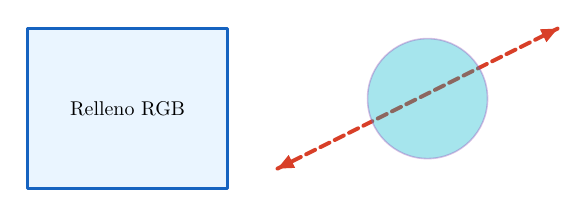
\begin{noctikspicture}[width=320,height=160]
  \NoctiksRect[stroke=blue,fill=0.9:0.95:1,width=1.4]{20,30}{100,80}
  \NoctiksLine[stroke=red,width=2,dash=5:3,arrow=both]{145,40}{285,110}
  \NoctiksCircle[stroke=purple,fill=cyan,opacity=0.35]{220,75}{30}
  \NoctiksLabel{70,70}{Relleno RGB}
\end{noctikspicture}
\end{document}
Reusable series styles
Signature:
\NoctiStyle{nombre}{opciones de estilo}
\NoctiPlot[style=nombre,...]{...}
NoctiStyle is declared inside a figure. It accepts the six base style keys plus marker and markersize. It does not accept kind, domains, sampling or axis limits. The name must be unique within the figure, non-empty and contain up to 32 ASCII letters, digits or _. All definitions in the figure are collected before being applied; they may appear before or after their use. Style names are not numerical constants.
| Parameter | Default | Values and unit | Example |
|---|---|---|---|
style in a series |
Omitted | Style name declared in the figure | style=medida |
marker |
auto |
auto, none, circle, square, triangle, diamond, cross |
marker=diamond |
markersize |
2.5 |
(0,20] bp |
markersize=3 |
palette on an axis or panel |
none |
none, scientific, gray |
palette=scientific |
Reusable styles apply to Plot, Function, Table, Parametric, Polar and FunctionPiece. They cannot be applied with style= to bands, fills, trajectories or geometry commands. A style declared in a panel belongs to the whole figure; do not declare the same name twice in different panels.
Precedence is: axis or panel palette → named style → options written in the series. An explicit key overrides an inherited one. A palette resets its counter at the start of each axis or panel. Each series from the six families above consumes a position, including those with an explicit colour; annotations and bands do not.
| Palette | Behaviour |
|---|---|
none |
Does not assign an automatic style; retains the base style, named style and series options |
scientific |
Cycles through blue, orange, green, purple, cyan, red; for bars, also sets the fill to that colour |
gray |
Black stroke; alternates between solid, 5:3, 1:3; bars cycle through RGB fills 0.25:0.25:0.25, 0.55:0.55:0.55, 0.8:0.8:0.8; scatter/error cycle through circle, square, triangle, diamond and cross |
\documentclass{article}
\usepackage[letterpaper,margin=15mm]{geometry}
\usepackage{noctiplots}
\setlength{\parindent}{0pt}
\begin{document}
\begin{noctiaxis}[width=420,height=250]
  [xmin=0,xmax=3,ymin=0,ymax=5,palette=scientific]
  \NoctiStyle{medida}{width=1.1,marker=diamond,markersize=3}
  \NoctiPlot[kind=scatter,style=medida]{0,1;1,2;2,2.5;3,4}
  \NoctiFunction[domain=0:3,width=1.5]{1+x}
  \NoctiFunction[domain=0:3,style=medida,stroke=purple,marker=none]{0.4+x}
  \NoctiLegend{Medidas}
  \NoctiLegend{Modelo}
  \NoctiLegend{Color explícito}
\end{noctiaxis}
\par\medskip
\begin{noctiaxis}[width=380,height=230]
  [xmin=0,xmax=3,ymin=0,ymax=5,palette=gray]
  \NoctiPlot[kind=scatter]{0,1;1,2;2,2.5;3,4}
  \NoctiPlot[kind=scatter]{0,1.5;1,2.5;2,3;3,4.5}
  \NoctiFunction[domain=0:3]{x+1}
\end{noctiaxis}
\end{document}
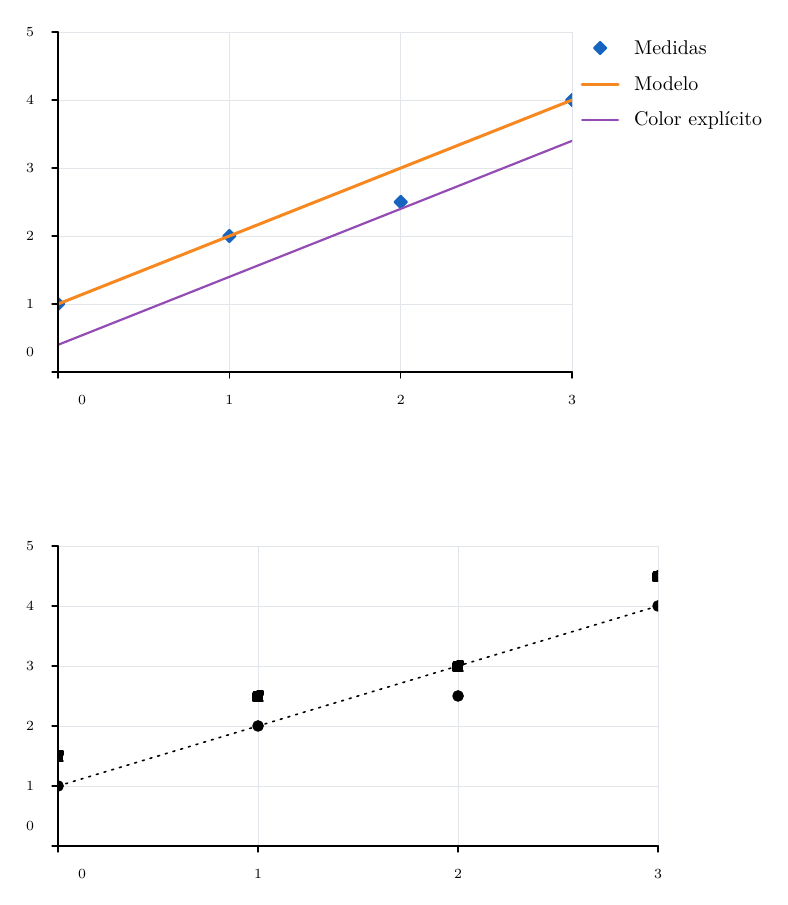
auto uses the symbol appropriate to the series type: scatter/error show symbols; an ordinary line has no symbols by default. Use a specific name to add them explicitly, or none to remove them.
Scientific template from the repository
The following example defines a reusable ScientificPlot environment and a \MeasurementStyle command. You can copy them into the project; they are an authoring template, not built-in commands provided by noctiplots.
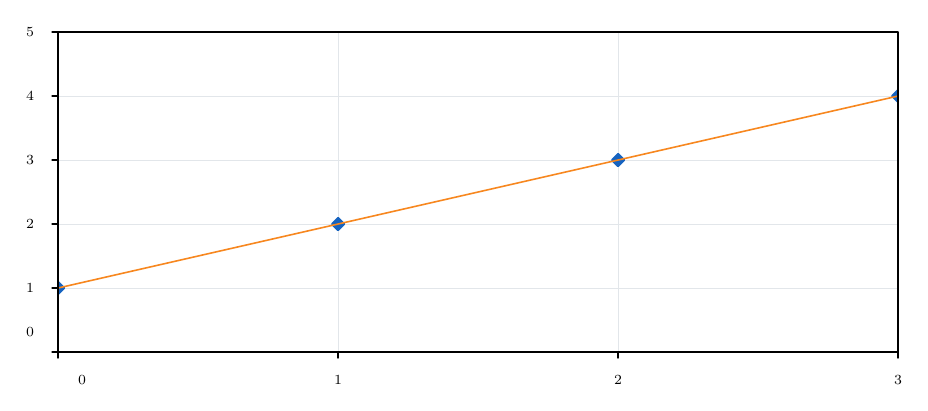
ScientificPlot uses a 500 × 240 bp canvas and the options axes=box,palette=scientific,grid=major. Its optional argument adds other axis options. Do not repeat axes, palette or grid, because duplicate keys fail. \MeasurementStyle declares, within the figure, a style named measurement with marker=diamond,markersize=3,width=1.1.
Self-contained example equivalent to loading the template:
\documentclass{article}
\usepackage[letterpaper,margin=15mm]{geometry}
\usepackage{noctiplots}
\newenvironment{ScientificPlot}[1][]{%
  \begin{noctiaxis}[width=500,height=240]
    [axes=box,palette=scientific,grid=major,#1]%
}{\end{noctiaxis}}
\newcommand{\MeasurementStyle}{%
  \NoctiStyle{measurement}{marker=diamond,markersize=3,width=1.1}%
}
\setlength{\parindent}{0pt}
\begin{document}
\begin{ScientificPlot}[xmin=0,xmax=3,ymin=0,ymax=5]
  \MeasurementStyle
  \NoctiPlot[kind=scatter,style=measurement]{0,1;1,2;2,3;3,4}
  \NoctiFunction[domain=0:3]{x+1}
\end{ScientificPlot}
\end{document}
CSV and TSV files
Signature:
\NoctiTable[opciones de serie y columnas]{ruta relativa}
The first row contains unique, non-empty headers. There must be at least one data row; all rows must have the same number of columns. The file must be UTF-8, with an optional BOM. LF, CRLF and CR line endings, double-quoted fields and quotes escaped as "" are supported. Leading and trailing whitespace is trimmed from fields, and completely empty rows are ignored.
Column names are case-sensitive. Each cell used as data must contain a finite number with an absolute value no greater than 1e12. Scientific notation is valid. Constants and formulae are not evaluated inside the file: 2*pi, NA, NaN and Inf are not valid table numbers. Unused columns may contain text; that text is not converted into LaTeX.
| Table parameter | Default | Values and condition | Example |
|---|---|---|---|
| Path, required argument | No value | Project-relative path; no empty components, . or .., or \, :, NUL or an initial / |
datos/ensayo.csv |
x |
x |
Horizontal column header | x=tiempo |
y |
y |
Vertical column header | y=altura |
delimiter |
tab if the extension is .tsv, case-insensitive; comma otherwise |
tab or comma; can be overridden explicitly |
delimiter=comma |
xerror |
Omitted: zero | Column of non-negative symmetric X error magnitudes | xerror=sigma_t |
yerror |
Omitted: zero | Column of non-negative symmetric Y error magnitudes | yerror=sigma_h |
xminus, xplus |
Omitted: zero | Pair of columns for non-negative asymmetric X error magnitudes | xminus=tm,xplus=tp |
yminus, yplus |
Omitted: zero | Pair of columns for non-negative asymmetric Y error magnitudes | yminus=hm,yplus=hp |
missing |
error |
error or gap; only an empty Y cell becomes a gap |
missing=gap |
kind |
line |
line, scatter, bar, error; same meaning as for Plot |
kind=error |
barwidth |
0.8 |
Positive, in X data units | barwidth=0.5 |
id |
Omitted | Series identifier for FillBetween; see its section | id=medicion |
| Series style | Common style | stroke, fill, width, dash, arrow, opacity, marker, markersize, style |
stroke=blue,marker=circle |
Do not combine symmetric and asymmetric errors on the same axis. An asymmetric pair must provide both column headers, even if one of the magnitudes is zero. Errors are distances from the central data value, not absolute endpoints. X and Y columns and their errors must produce coordinates compatible with the axis scales.
A table with a single sample requires a type other than line, for example kind=scatter. A line requires at least two finite samples. missing=gap does not sort or interpolate the table: it preserves row order and breaks the polyline. X is still required in a row with an empty Y; NA does not represent an empty cell.
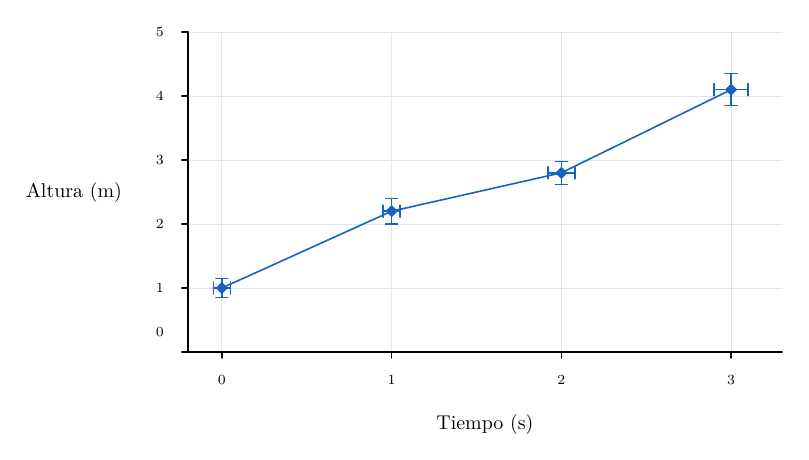
Example with custom columns and symmetric errors. In a normal project, save the CSV contents in datos-simetricos.csv and remove the filecontents* environment; it is included here to make the document self-contained.
\documentclass{article}
\usepackage[letterpaper,margin=15mm]{geometry}
\usepackage{noctiplots}
\begin{filecontents*}{datos-simetricos.csv}
tiempo,altura,sigma_t,sigma_h
0,1.0,0.05,0.15
1,2.2,0.05,0.20
2,2.8,0.08,0.18
3,4.1,0.10,0.25
\end{filecontents*}
\setlength{\parindent}{0pt}
\begin{document}
\begin{noctiaxis}[width=400,height=240]
  [xmin=-0.2,xmax=3.3,ymin=0,ymax=5]
  \NoctiTable[x=tiempo,y=altura,xerror=sigma_t,yerror=sigma_h,
    kind=error,marker=diamond,stroke=blue]{datos-simetricos.csv}
  \NoctiXLabel{Tiempo (s)}
  \NoctiYLabel{Altura (m)}
\end{noctiaxis}
\end{document}
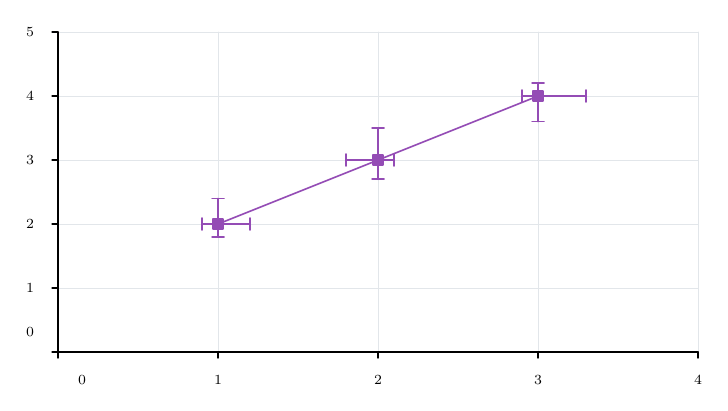
Example with asymmetric errors on both axes:
\documentclass{article}
\usepackage[letterpaper,margin=15mm]{geometry}
\usepackage{noctiplots}
\begin{filecontents*}{datos-asimetricos.csv}
x,y,xm,xp,ym,yp
1,2,0.1,0.2,0.2,0.4
2,3,0.2,0.1,0.3,0.5
3,4,0.1,0.3,0.4,0.2
\end{filecontents*}
\setlength{\parindent}{0pt}
\begin{document}
\begin{noctiaxis}[width=400,height=240]
  [xmin=0,xmax=4,ymin=0,ymax=5]
  \NoctiTable[kind=error,xminus=xm,xplus=xp,yminus=ym,yplus=yp,
    marker=square,stroke=purple]{datos-asimetricos.csv}
\end{noctiaxis}
\end{document}
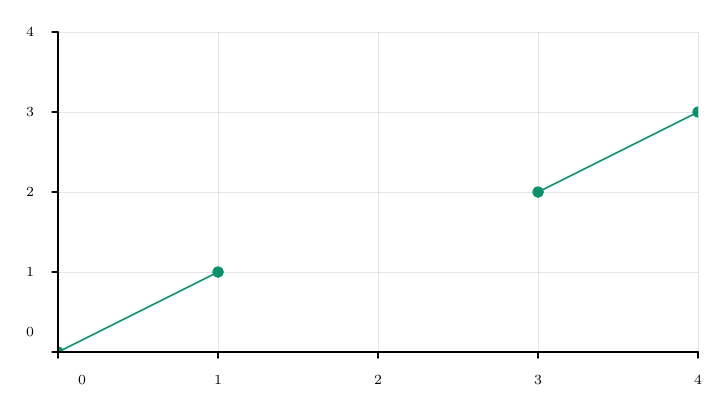
Example with an explicit gap. The rows before and after x=2 form separate segments.
\documentclass{article}
\usepackage[letterpaper,margin=15mm]{geometry}
\usepackage{noctiplots}
\begin{filecontents*}{datos-hueco.csv}
x,y
0,0
1,1
2,
3,2
4,3
\end{filecontents*}
\setlength{\parindent}{0pt}
\begin{document}
\begin{noctiaxis}[width=400,height=240]
  [xmin=0,xmax=4,ymin=0,ymax=4]
  \NoctiTable[missing=gap,marker=circle,stroke=green]{datos-hueco.csv}
\end{noctiaxis}
\end{document}
For TSV, create a file such as datos.tsv with a real tab between each field and use \NoctiTable{datos.tsv}. Do not write the two characters \t instead of a tab. If a tab-separated file has another extension, specify delimiter=tab; if a .tsv file contains commas, specify delimiter=comma.
Default limits: 8 000 000 bytes per file, 128 columns, 8192 bytes of content per field and up to 100 000 data rows, in addition to the shared point budget for the figure. The header does not count as a data row. Quoted fields may contain delimiters; to represent a number, the entire field must still be numeric.
Axes and plot area
noctiaxis takes two separate optional lists: physical dimensions and axis configuration. Interior coordinates use data units; width, height, line widths and offsets use bp. One bp equals 1/72 of an inch.
\begin{noctiaxis}[width=420,height=260][opciones del eje]
  comandos de series, anotaciones y etiquetas
\end{noctiaxis}
If the first list is omitted, the canvas is 320 × 200 bp. To configure only the axis, write \begin{noctiaxis}[][axes=box]. width in the first list measures the whole canvas, including margins and legends; in a series it measures the stroke width.
Limits and presentation
| Parameter | Values and default | Effect and example |
|---|---|---|
xmin, xmax |
Finite numbers within ±1e12; automatic when omitted | Horizontal limits. Minimum < maximum is required. xmin=-2,xmax=2. |
ymin, ymax |
Same rules; automatic | Vertical limits. ymin=-1,ymax=4. |
xscale, yscale |
linear or log; linear |
Linear scale or base-10 logarithm. yscale=log. |
axes |
edge, origin, box, origin-box; edge |
Bottom/left axes; crossing at zero; frame; frame and crossing at zero, respectively. |
ticks |
axis or edge |
edge by default with origin-box; axis otherwise. Determines where ticks and numbers are placed. |
axisarrows |
none, end, both; none |
Arrowheads on the two main axes, not on every frame edge. end points towards positive X/Y. |
aspect |
auto or equal; auto |
equal preserves the same physical length per X and Y unit; requires linear axes. |
xmargin, ymargin |
Fraction from 0 to 1; 0 |
Adds that fraction of the range to each automatic endpoint. ymargin=0.1 adds 10 % on each side. |
ylabeldx |
From −40 to 40 bp; 0 |
Adjusts the horizontal Y label. Positive values move it towards the axis. Requires \NoctiYLabel and sufficient space to avoid the numbers. |
labelcollision |
manual or avoid; manual |
Optional point-label placement; see Annotations and reference lines. |
bars |
overlay, grouped, stacked; overlay |
Layout of all bar series on the axis. |
palette |
none, scientific, gray; none |
Styles by series order. See Styles and colours. |
Automatic ranging includes series samples, error endpoints, bar widths and heights, direct-band bounds and scalar-grid extents. Annotated points, reference lines, explicit vectors, vector fields, regions and fills under curves do not extend it. To draw only these decorations, declare all four limits. If series exist but none provides finite samples or other range data, the axis fails even with explicit limits; a line also requires its two finite samples.
Explicit limits take priority and clip the geometry; a function’s evaluation domain is configured separately. A constant automatic range is expanded. In origin and origin-box, automatic linear endpoints include zero before margins are applied. If zero falls outside an explicit range, the axis crosses at the nearest edge and emits a diagnostic; on a logarithmic scale, it crosses at the lower limit.
Logarithmic scales require positive coordinates and error endpoints, even when the data is outside the visible window. Logarithmic margins are calculated in log10 space. aspect=equal preserves the limits and centres a reduced area within the canvas; it does not force a square frame when the X/Y ranges differ. The usable area must be at least 70 × 60 bp after space for text has been reserved.
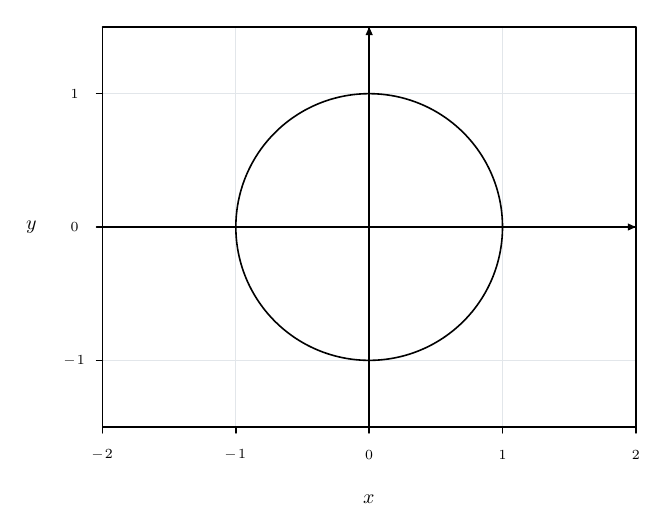
Example with origin, frame, arrows and equal units:
\begin{noctiaxis}[width=420,height=280]
  [axes=origin-box,ticks=edge,axisarrows=end,aspect=equal,
   xmin=-2,xmax=2,ymin=-1.5,ymax=1.5]
  \NoctiParametric[domain=0:2*pi,samples=301]{cos(t)}{sin(t)}
  \NoctiXLabel{$x$}\NoctiYLabel{$y$}
\end{noctiaxis}
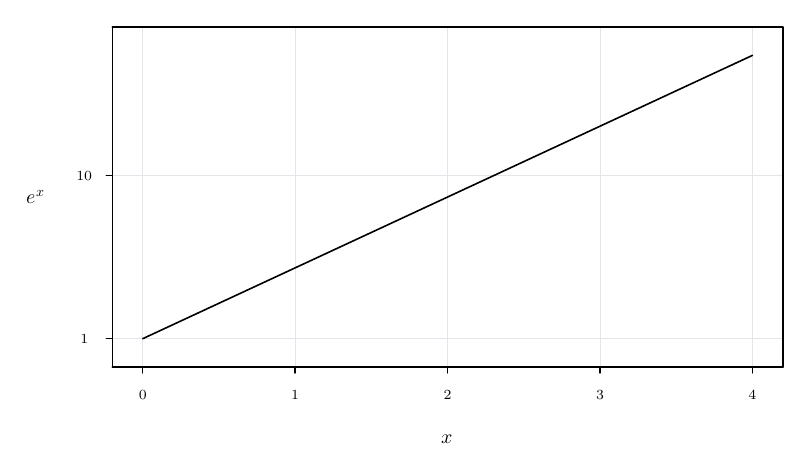
Example of a logarithmic scale and automatic margins:
\begin{noctiaxis}[width=400,height=250]
  [axes=box,yscale=log,xmargin=0.05,ymargin=0.1]
  \NoctiFunction[domain=0:4,samples=101]{exp(x)}
  \NoctiXLabel{$x$}\NoctiYLabel{$e^x$}
\end{noctiaxis}
Grid and ticks
| Parameter | Values and default | Effect and example |
|---|---|---|
grid |
true, false, major, minor, both, none; true |
true is equivalent to major; false is equivalent to none. |
gridaxis |
both, x, y; both |
Vertical X gridlines, horizontal Y gridlines, or both. |
xtickstep, ytickstep |
Positive step; selected automatically when omitted | Only on linear scales. xtickstep=0.5. At most 200 major ticks per axis. |
xminor, yminor |
Integers from 1 to 10; 2 |
Subdivisions per major interval. 1 adds no minor lines. |
gridcolor |
Colour; 0.86:0.88:0.9 |
Major gridline colour. gridcolor=gray. |
gridwidth |
Stroke width in (0,100] bp; 0.4 |
gridwidth=0.6. |
griddash |
Positive list separated by :; solid |
griddash=3:2; griddash= restores a solid line. |
gridopacity |
From 0 to 1; 1 |
gridopacity=0.5. |
minorgridcolor |
Colour; 0.94:0.94:0.94 |
Minor gridline colour. |
minorgridwidth |
Width in (0,100] bp; 0.25 |
minorgridwidth=0.3. |
minorgriddash |
Positive list separated by :; solid |
minorgriddash=1:3. |
minorgridopacity |
From 0 to 1; 1 |
minorgridopacity=0.6. |
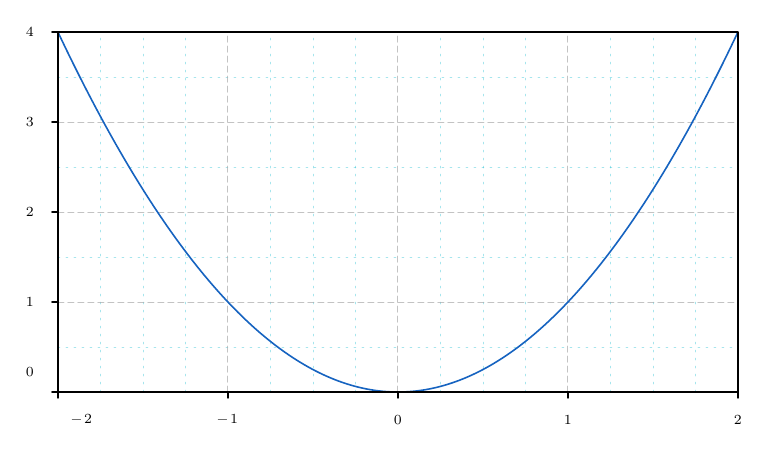
Changing the style does not enable a disabled grid. Minor subdivisions add neither numbers nor small tick marks to the axis. On logarithmic scales, they are spaced geometrically: with two subdivisions between 1 and 10, the intermediate line is at √10. The minor-grid traversal is limited to 2000 candidates per axis and to the figure budget.
\begin{noctiaxis}[width=420,height=260]
  [xmin=-2,xmax=2,ymin=0,ymax=4,axes=box,grid=both,gridaxis=both,
   xtickstep=1,ytickstep=1,xminor=4,yminor=2,
   gridcolor=gray,gridwidth=0.5,griddash=3:2,gridopacity=0.7,
   minorgridcolor=cyan,minorgridwidth=0.25,minorgriddash=1:3,
   minorgridopacity=0.35]
  \NoctiFunction[domain=-2:2,stroke=blue]{x^2}
\end{noctiaxis}
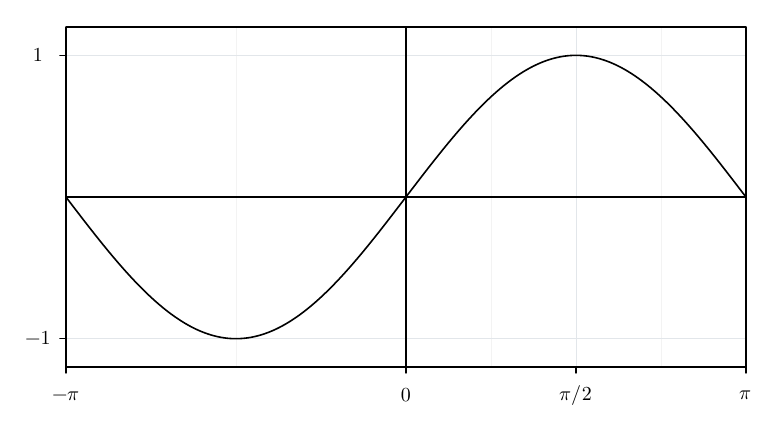
\NoctiXTick{posición}{texto TeX} and \NoctiYTick{posición}{texto TeX} replace all automatic ticks on the corresponding axis. They do not extend the limits. Up to 200 per axis are supported, with distinct positions within the final range. Do not combine them with xtickstep/ytickstep on the same axis. The major grid follows those positions; the minor grid subdivides the intervals between ticks without extrapolating beyond the custom ticks. A single tick produces no subdivisions.
\begin{noctiaxis}[width=420,height=250]
  [xmin=-pi,xmax=pi,ymin=-1.2,ymax=1.2,axes=origin-box,grid=both]
  \NoctiFunction[domain=-pi:pi,samples=301]{sin(x)}
  \NoctiXTick{-pi}{$-\pi$}\NoctiXTick{0}{$0$}
  \NoctiXTick{pi/2}{$\pi/2$}\NoctiXTick{pi}{$\pi$}
  \NoctiYTick{-1}{$-1$}\NoctiYTick{1}{$1$}
\end{noctiaxis}
Titles and legends
| Command | Argument and behaviour |
|---|---|
\NoctiTitle{texto} |
One title per axis. |
\NoctiXLabel{texto} |
One X label, outside the data area. |
\NoctiYLabel{texto} |
One horizontal Y label, outside the data area. |
\NoctiLegend{texto} |
One entry per series, in series order. Legend entries for the final series may be omitted. |
Text supports TeX and is measured using its actual typography. Fills, regions, bands, reference lines and explicit vectors do not consume legend entries. Trajectories and streamlines are series. Legends reproduce strokes, markers, bar fills and errors; their position is not optimised to avoid curves.
| Parameter | Values and default | Example and effect |
|---|---|---|
legendpos |
right, topright, topleft, topcenter, bottomleft, bottomcenter, bottomright, center, custom; right |
right is outside; the others are inside. |
legendsize |
inherit, tiny, scriptsize, footnotesize, small, normalsize, large; inherit |
legendsize=small applies the font before measuring. |
legendgap |
From 0 to 100 bp; automatic when omitted | With no explicit value, row spacing = the greater of 18 bp and tallest entry height + 6 bp. With a value: tallest entry height, at least 5 bp, + gap. |
legendpadding |
From 0 to 100 bp | Inside: 8 bp horizontally and 6 vertically when omitted; legendpadding=5 uses 5 in both directions. |
legenddx, legenddy |
From −2000 to 2000 bp; 0 |
Positive values shift right/up. |
legendat |
u:v, both from 0 to 1; required with custom |
legendat=0.5:0.98: position relative to the data area, independent of the scale. |
legendanchor |
northwest, north, northeast, center, southwest, south, southeast; northwest |
Point of the legend box fixed at legendat; only with custom. |
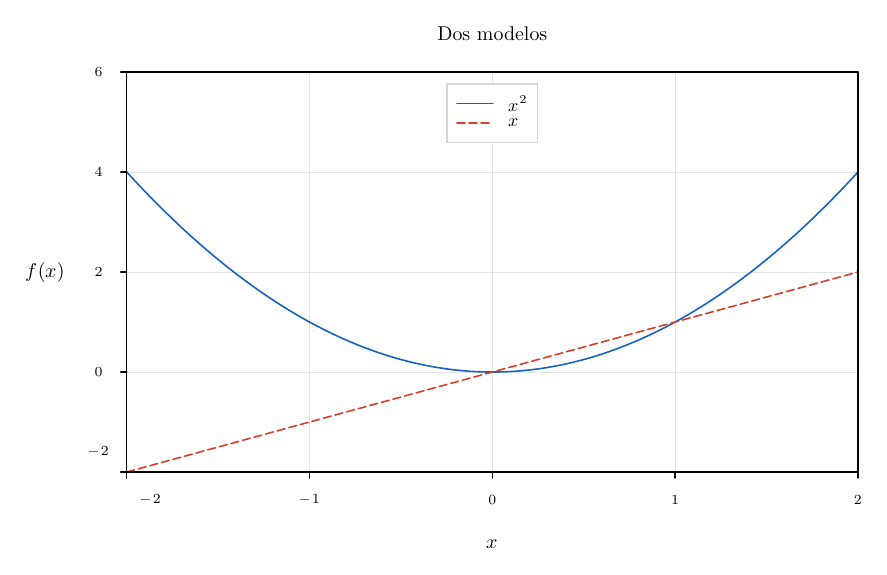
legendat and legendanchor require legendpos=custom. An internal legend must fit within the usable area; an external legend must fit within its allocated space. Overflow causes an error. The internal white background obscures geometry; TeX text for other labels is composed above it. An explicit font within an entry may override legendsize.
\begin{noctiaxis}[width=440,height=280]
  [xmin=-2,xmax=2,ymin=-2,ymax=6,axes=box,
   legendpos=custom,legendat=0.5:0.98,legendanchor=north,
   legendsize=small,legendgap=2,legendpadding=5,legenddx=0,legenddy=-2,
   ylabeldx=2]
  \NoctiFunction[domain=-2:2,stroke=blue]{x^2}
  \NoctiFunction[domain=-2:2,stroke=red,dash=4:2]{x}
  \NoctiLegend{$x^2$}\NoctiLegend{$x$}
  \NoctiTitle{Dos modelos}\NoctiXLabel{$x$}\NoctiYLabel{$f(x)$}
\end{noctiaxis}
Data series and error bars
\NoctiPlot[opciones]{x,y;...}
\NoctiTable[opciones]{ruta relativa del CSV o TSV}
Samples retain their order; Noctiks does not sort or aggregate data. A line requires at least two finite samples; for an isolated point, use scatter, bar or error. All common stroke options are supported, together with the following:
| Parameter | Values and default | Example and scope |
|---|---|---|
kind |
line, scatter, bar, error; line |
error connects samples and draws errors; scatter draws disconnected points, including their errors. |
barwidth |
Positive, up to the general numerical limit; 0.8 X units |
Bar width; barwidth=0.6. |
marker |
auto, none, circle, square, triangle, diamond, cross; auto |
auto: circle for scatter/error; no marker for lines/bars. |
markersize |
Half-extent in (0,20] bp; 2.5 |
markersize=3. Not the diameter. |
id |
Unique name of 1–32 alphanumeric ASCII characters or _; no ID |
Available in Plot, Table and Function for NoctiFillBetween. id=modelo. |
style |
Name of NoctiStyle; no named style |
Expanded before the series is validated. style=medida. |
errors |
symmetric or asymmetric; symmetric |
Only NoctiPlot: changes how tuples are interpreted. |
x, y |
Headers; x, y |
Only NoctiTable: x=tiempo,y=senal. |
xerror, yerror |
Optional headers; no error | Symmetric magnitudes on each axis. |
xminus, xplus, yminus, yplus |
Optional pairs of headers | Asymmetric magnitudes. Provide both sides of the selected axis. |
delimiter |
comma or tab; according to the extension |
.tsv → tab; any other extension → comma. |
missing |
error or gap; error |
An empty Y cell breaks the series with gap; X remains numeric. |
Symbols use fill if declared; otherwise, stroke. cross uses strokes only. Error bars have 6 bp caps and contribute to automatic ranging. Errors are non-negative distances from the measurement, never absolute endpoints. For example, (y=10, yminus=2, yplus=5) covers [8,15].
Symmetric format for NoctiPlot: x,y[,yerror[,xerror]], with two to four fields. Asymmetric: x,y,yminus,yplus[,xminus,xplus], with exactly four or six fields. For tables, do not use errors: the selected headers define the format. Symmetric Y can be combined with asymmetric X; do not mix yerror with yminus/yplus, or the equivalent in X.
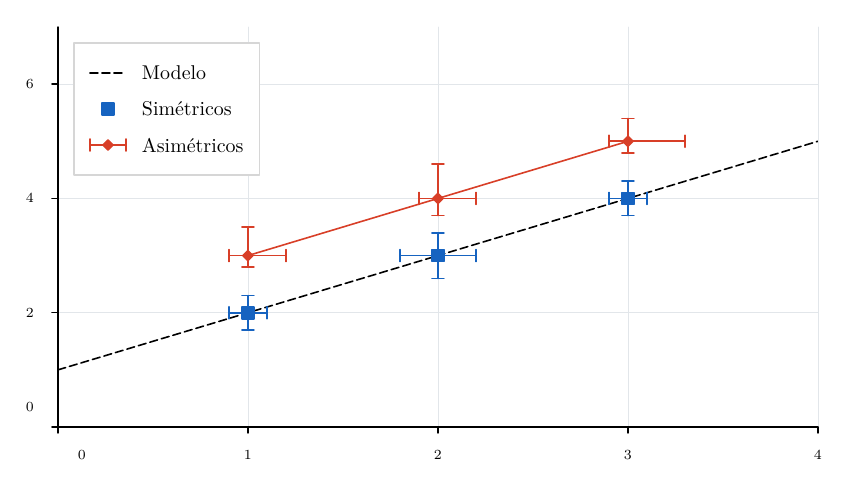
Example with symmetric and asymmetric errors, different markers and a model line:
\begin{noctiaxis}[width=460,height=280]
  [xmin=0,xmax=4,ymin=0,ymax=7,legendpos=topleft]
  \NoctiFunction[domain=0:4,stroke=black,dash=4:2]{1+x}
  \NoctiPlot[kind=scatter,stroke=blue,marker=square,markersize=3]
    {1,2,0.3,0.1;2,3,0.4,0.2;3,4,0.3,0.1}
  \NoctiPlot[kind=error,errors=asymmetric,stroke=red,marker=diamond]
    {1,3,0.2,0.5,0.1,0.2;2,4,0.3,0.6,0.1,0.2;3,5,0.2,0.4,0.1,0.3}
  \NoctiLegend{Modelo}\NoctiLegend{Simétricos}\NoctiLegend{Asimétricos}
\end{noctiaxis}
Self-contained table example with asymmetric errors and a gap. The block includes an auxiliary file within the .tex itself; place the complete block in the document, following the rules in the initial examples:
\documentclass{article}
\usepackage[letterpaper,margin=15mm]{geometry}
\usepackage{noctiplots}
\begin{filecontents*}[overwrite]{manual-medidas.csv}
t,valor,menos,mas
0,1,0.1,0.2
1,2,0.2,0.4
2,,,
3,3,0.3,0.2
4,4,0.2,0.5
\end{filecontents*}
\setlength{\parindent}{0pt}
\begin{document}
\begin{noctiaxis}[width=400,height=260][axes=box]
  \NoctiTable[x=t,y=valor,yminus=menos,yplus=mas,missing=gap,
    kind=error,stroke=blue,marker=circle]{manual-medidas.csv}
  \NoctiXLabel{Tiempo}\NoctiYLabel{Medición}
\end{noctiaxis}
\end{document}
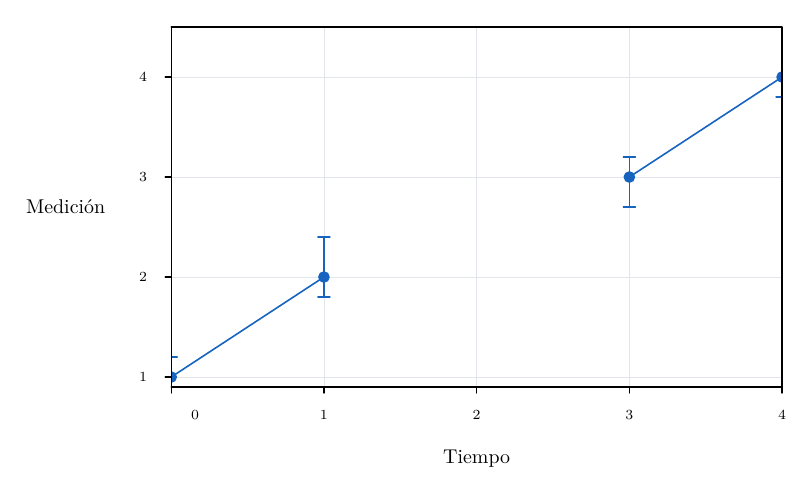
missing=gap also omits errors on that row. NaN, NA and invalid text do not become gaps. A completely empty row is ignored and does not separate segments: to create a gap, keep X and leave Y empty.
Overlaid, grouped and stacked bars
On a linear Y scale, ordinary bars start at zero; on logarithmic Y, they start at the lower limit. A bar must not cross the origin of a logarithmic X scale. For bars=grouped or stacked both axes must be linear and at least one bar series must exist.
With grouped and stacked, bar series must have exactly the same unique X categories in the same order, with equal barwidth, no gaps and no non-zero errors. Missing categories are not filled in.
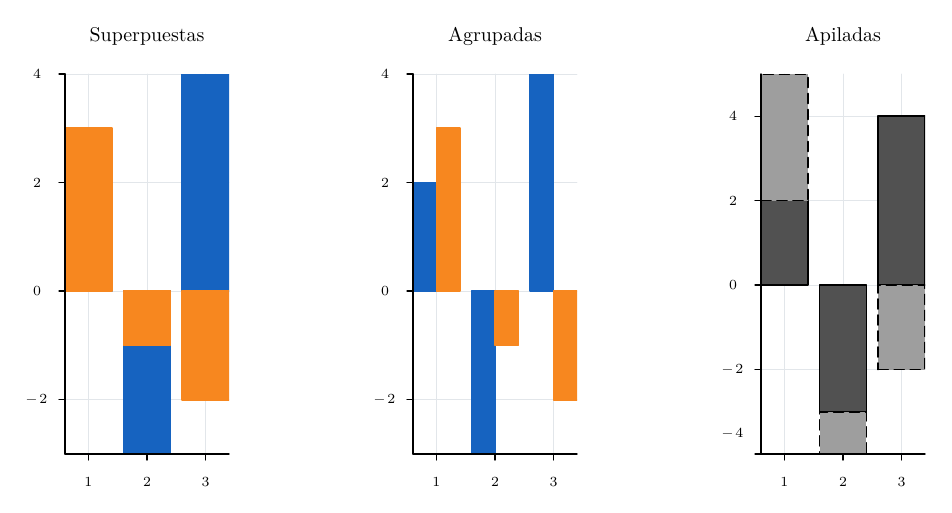
| Layout | Result |
|---|---|
overlay |
Each series uses its full barwidth; they overlay in drawing order. |
grouped |
Divides the total width among the bar series and offsets their centres within each category. |
stacked |
Accumulates positive values upwards from zero and negative values downwards separately. Does not normalise to percentages. |
\begin{noctipanels}[width=510,height=270][rows=1,columns=3,gap=12]
  \begin{noctipanel}[bars=overlay,palette=scientific,legendpos=topright]
    \NoctiPlot[kind=bar]{1,2;2,-3;3,4}
    \NoctiPlot[kind=bar]{1,3;2,-1;3,-2}
    \NoctiTitle{Superpuestas}
  \end{noctipanel}
  \begin{noctipanel}[bars=grouped,palette=scientific]
    \NoctiPlot[kind=bar,barwidth=0.8]{1,2;2,-3;3,4}
    \NoctiPlot[kind=bar,barwidth=0.8]{1,3;2,-1;3,-2}
    \NoctiTitle{Agrupadas}
  \end{noctipanel}
  \begin{noctipanel}[bars=stacked,palette=gray]
    \NoctiPlot[kind=bar]{1,2;2,-3;3,4}
    \NoctiPlot[kind=bar]{1,3;2,-1;3,-2}
    \NoctiTitle{Apiladas}
  \end{noctipanel}
\end{noctipanels}
Functions and curves
Cartesian functions
\NoctiFunction[opciones]{f(x)} evaluates an expression in the variable x; it only accepts kind=line. It can be repeated within an axis and combined with data. Line styles, markers and named styles follow the series contract.
| Parameter | Values and default | Example and meaning |
|---|---|---|
domain |
Increasing interval a:b; -5:5 |
domain=0:2*pi. Independent of xmin/xmax. |
samples |
Integer from 2 to 10001; 201 |
Initial uniformly spaced samples, including both endpoints. |
sampling |
uniform or adaptive; uniform |
Optional refinement of the drawing. |
tolerance |
In (0,100] bp; 0.5 |
Only adaptive: midpoint deviation from the chord in final drawing coordinates. |
maxsamples |
Integer; 10001 |
Only adaptive: evaluation budget, at least 2*samples-1, at most 100001 and subject to the figure budget. |
rangesamples |
0 or an integer from 2 to 10001; 0 |
Additional scan for automatic axis limits, independent of the drawing samples. |
id |
Series identifier; no ID | id=superior for fills between curves; unavailable for parametric or polar curves. |
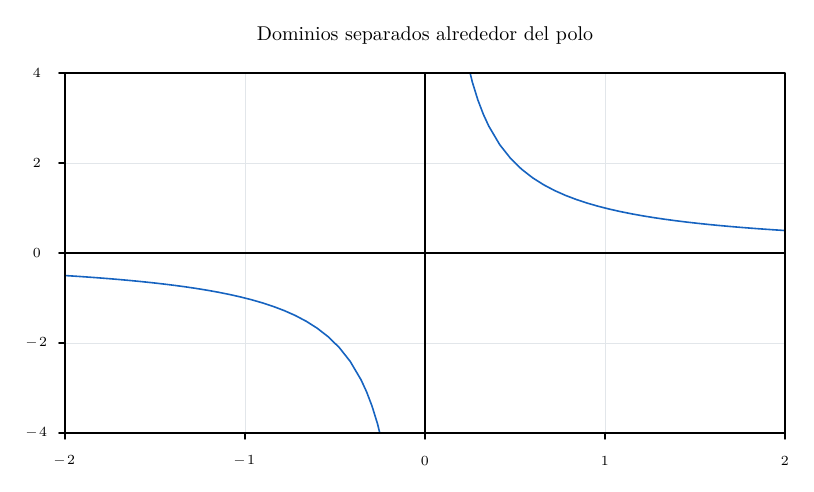
Uniform sampling checks midpoints and separates undefined values or suspicious jumps. It may miss narrow singularities or oscillations aligned with the samples. Adaptive mode refines to a maximum depth of 16; if it exhausts the budget or depth, or encounters an undefined midpoint, it breaks the segment and emits a diagnostic. tolerance is not a global bound on mathematical error.
Automatic axis limits use the initial samples and, if requested, rangesamples; adaptive refinement does not change the framing. rangesamples consumes an additional budget, discards undefined values with a diagnostic and does not guarantee exact extrema. Near poles, large finite values can expand the axis considerably: use explicit limits and separate known discontinuities.
\begin{noctiaxis}[width=440,height=260]
  [xmin=-2,xmax=2,ymin=-4,ymax=4,axes=origin-box]
  \NoctiFunction[domain=-2:-0.05,samples=33,sampling=adaptive,
    tolerance=0.4,maxsamples=6001,rangesamples=401,stroke=blue]{1/x}
  \NoctiFunction[domain=0.05:2,samples=33,sampling=adaptive,
    tolerance=0.4,maxsamples=6001,rangesamples=401,stroke=blue]{1/x}
  \NoctiTitle{Dominios separados alrededor del polo}
\end{noctiaxis}
Parametric and polar curves
\NoctiParametric[opciones]{x(t)}{y(t)}
\NoctiPolar[opciones]{r(t)}
They use t and radians. They share domain, samples, sampling, tolerance, maxsamples, rangesamples, markers and function styles; the default domain is 0:6.283185307179586. Only kind=line; no id. Parametric curves preserve order, loops and repeated X values. Polar curves map to (r*cos(t), r*sin(t)); negative radii are accepted, and no angular or radial grid is created.
Closure is not forced: the expressions and domain determine whether the endpoints coincide. Undefined values separate segments. On logarithmic axes, all valid coordinates in logarithmic dimensions must be positive. Use aspect=equal to preserve shapes and angles.
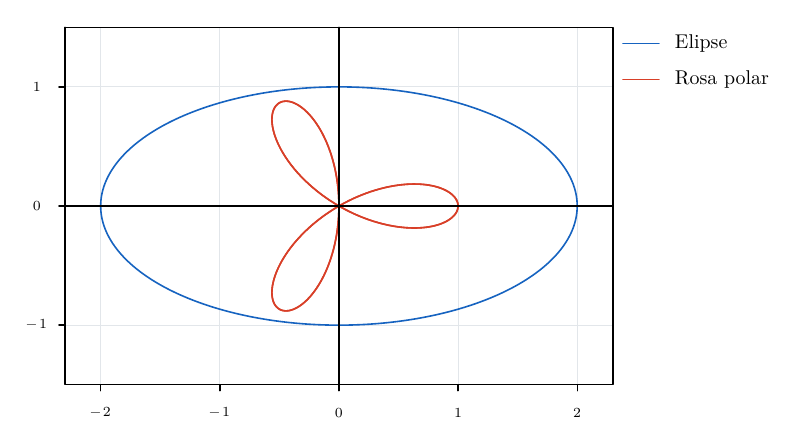
\begin{noctiaxis}[width=420,height=280]
  [axes=origin-box,aspect=equal,xmin=-2.3,xmax=2.3,ymin=-1.5,ymax=1.5]
  \NoctiParametric[domain=0:2*pi,samples=301,stroke=blue]
    {2*cos(t)}{sin(t)}
  \NoctiPolar[domain=0:2*pi,samples=501,stroke=red]{cos(3*t)}
  \NoctiLegend{Elipse}\NoctiLegend{Rosa polar}
\end{noctiaxis}
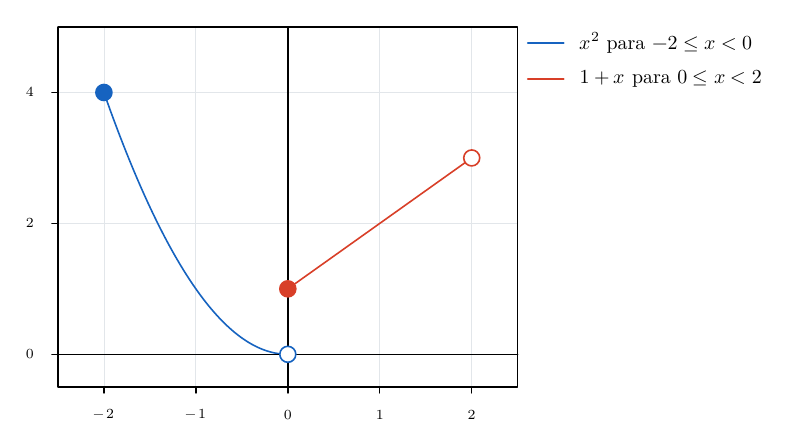
Piecewise functions and endpoints
\NoctiFunctionPiece[opciones]{a:b}{f(x)}
Each piece is an independent series; its endpoints are not connected to another piece. The increasing domain is a required argument; do not repeat domain in the options. It accepts function sampling and styles, together with the following specific options. Series markers (marker, markersize) and id are not accepted in FunctionPiece, including when inherited from a named style; endpoints are controlled with these keys:
| Parameter | Values and default | Effect and example |
|---|---|---|
start |
none, open, closed; none |
Symbol at the initial endpoint. start=closed. |
end |
none, open, closed; none |
Symbol at the final endpoint. end=open. |
endpointradius |
In (0,20] bp; 3 |
Radius of both symbols. endpointradius=4. |
Endpoints are evaluated numerically even when the symbol is open. If an endpoint is undefined, requesting its marker fails: symbolic limits are not computed. Open markers have a white fill; closed markers use stroke; both are opaque with a solid outline, regardless of dash/opacity/fill. All closed markers are painted after all open markers, so inclusion takes precedence when they coincide. They do not change automatic axis limits or legends.
\begin{noctiaxis}[width=420,height=260]
  [xmin=-2.5,xmax=2.5,ymin=-0.5,ymax=5,axes=origin-box]
  \NoctiFunctionPiece[start=closed,end=open,endpointradius=4,
    stroke=blue,samples=101]{-2:0}{x^2}
  \NoctiFunctionPiece[start=closed,end=open,endpointradius=4,
    stroke=red,samples=101]{0:2}{1+x}
  \NoctiLegend{$x^2$ para $-2\le x<0$}
  \NoctiLegend{$1+x$ para $0\le x<2$}
\end{noctiaxis}
Regions and fills
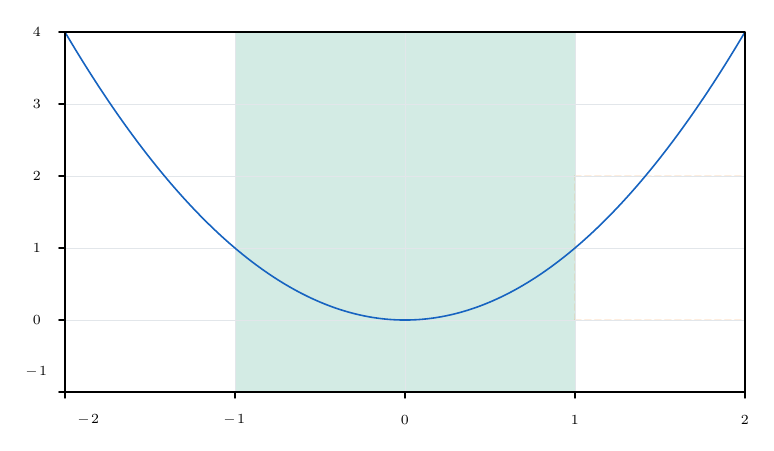
Rectangular regions
\NoctiRegion[opciones]{esquina}{esquina opuesta} shades a rectangle in data units. The corners may be supplied in either order, with non-zero width and height. It does not affect automatic axis limits or create a legend entry.
| Parameter | Default and limits | Example |
|---|---|---|
fill |
blue; colour or none |
fill=green. none requires border=true. |
opacity |
0.15; from 0 to 1 |
opacity=0.2, applied to the outline and fill. |
border |
false; Boolean |
border=true draws the original outline. |
stroke, width, dash |
blue, 0.8 bp, solid |
Outline style. stroke=orange,width=1,dash=3:2. |
Arrows are not accepted. Clipping does not create outlines at the viewport boundary. Regions outside the area are omitted with a diagnostic. On logarithmic axes, both corners must be positive in logarithmic dimensions.
\begin{noctiaxis}[width=420,height=260]
  [xmin=-2,xmax=2,ymin=-1,ymax=4,axes=box]
  \NoctiRegion[fill=green,opacity=0.18]{-1,-1}{1,4}
  \NoctiRegion[fill=none,border=true,stroke=orange,width=1,dash=3:2]
    {1,0}{2,2}
  \NoctiFunction[domain=-2:2,stroke=blue]{x^2}
\end{noctiaxis}
Area fills and Riemann rectangles
\NoctiFillUnder[opciones]{f(x)}
\NoctiRiemann[opciones]{f(x)}
They require linear axes and an explicit domain. They are decorations: they neither determine axis limits nor create legend entries. baseline is an absolute Y coordinate; when the function lies below it, the fill extends downwards. No integral or sum value is computed or printed.
| Parameter | Values and default | Use and example |
|---|---|---|
domain |
a:b increasing; required |
Both: domain=0:2. |
baseline |
Number in data units; 0 |
Both: baseline=1. |
samples |
Integer from 2 to 10000; 201 |
FillUnder only; samples=101. The budget may impose a lower maximum. |
n |
Integer from 1 to 10000; 10 |
Riemann only, equal-width rectangles; n=8. |
method |
left, right, midpoint; midpoint |
Riemann only: evaluation point within each cell. |
fill, stroke |
blue, blue |
Area and outline colours. fill=cyan,stroke=blue. |
opacity |
From 0 to 1; 0.2 |
Affects the area and outline. |
border |
FillUnder: false required; Riemann: true |
border=false suppresses outlines in Riemann. |
width, dash |
0.8 bp, solid; common style limits |
Riemann outline, for example width=0.5,dash=2:1. |
FillUnder joins samples linearly and checks midpoints; overlay NoctiFunction for the curve outline. Each cell reserves four points. Both commands require finite values at their evaluation points and fail on undefined values; split or restrict the interval. They do not accept sampling=adaptive. fill=none requires a visible outline and therefore cannot be used for FillUnder.
\begin{noctipanels}[width=510,height=280][rows=1,columns=2,gap=18]
  \begin{noctipanel}[xmin=0,xmax=2,ymin=0,ymax=4.5,axes=box]
    \NoctiFillUnder[domain=0:2,samples=101,fill=cyan,opacity=0.3]{x^2}
    \NoctiFunction[domain=0:2,stroke=blue]{x^2}
    \NoctiTitle{Área bajo curva}
  \end{noctipanel}
  \begin{noctipanel}[xmin=0,xmax=2,ymin=0,ymax=4.5,axes=box]
    \NoctiRiemann[domain=0:2,n=8,method=midpoint,baseline=0,
      fill=orange,stroke=red,width=0.5,border=true,opacity=0.3]{x^2}
    \NoctiFunction[domain=0:2,stroke=blue]{x^2}
    \NoctiTitle{Punto medio}
  \end{noctipanel}
\end{noctipanels}
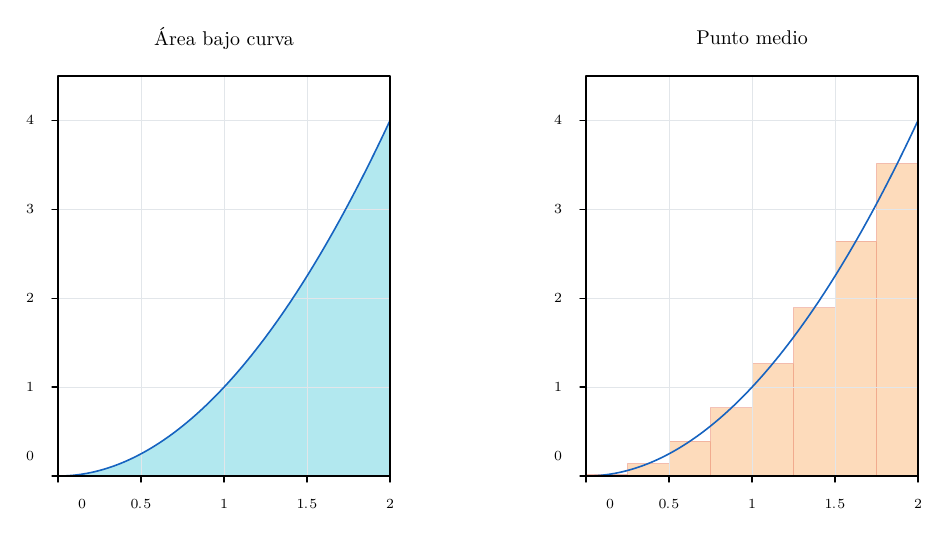
To compare rules, replace method=midpoint with left or right. Keeping the domain and n lets you compare the graphical approximations using the same partition.
Direct bands and fills between series
\NoctiBand[opciones]{límite inferior f(x)}{límite superior g(x)}
\NoctiFillBetween[opciones]{idA}{idB}
Both require linear axes and draw only the area, without outlines or legend entries. Band boundaries are absolute values, not error distances. The user determines their scientific meaning; confidence intervals are not inferred.
| Parameter | Band | FillBetween |
|---|---|---|
domain |
Required, a:b increasing |
Optional: restricts the common domain without extrapolation. |
samples |
Integer from 2 to 10001; 201, uniform |
Not accepted: uses the series samples. |
fill |
Colour, blue by default; none invalid |
Same. |
opacity |
From 0 to 1; 0.2 |
Same. |
Band contributes both boundaries to automatic axis limits, even when they coincide and the area is zero. Both must be defined and correctly ordered at evaluated samples and midpoints; an error occurs if the lower boundary exceeds the upper one. It does not automatically draw the centre curve or its boundaries.
FillBetween accepts forward references to id from Plot, Function and Table in the same axis. Its boundaries must be lines with strictly increasing X; irregularly spaced data and uniformly sampled functions are accepted, but parametric, polar or adaptive boundaries, bars and scatter series are not. It interpolates common abscissae linearly without requiring the same number of samples. It splits crossings and preserves gaps. Reversing A/B does not change the fill. With no overlap of positive width, it emits a diagnostic and retains the series.
Fills are painted once per compound region to avoid darkening the joins between cells. Separate fills still overlap in declaration order. Add explicit series when outlines are required.
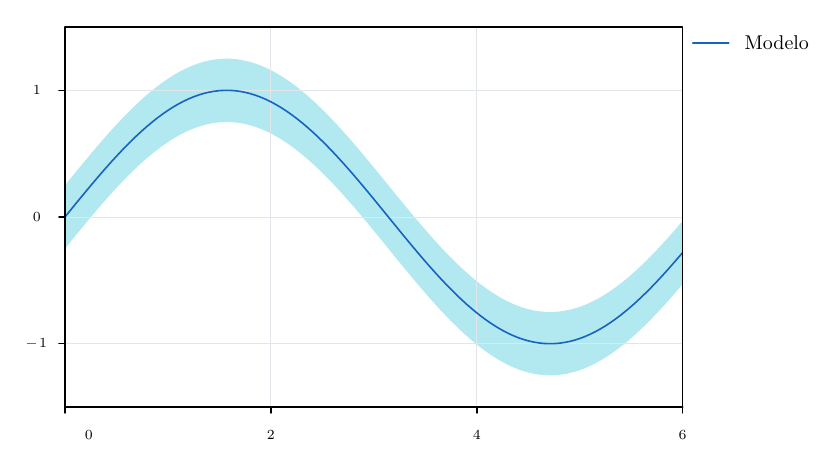
\begin{noctiaxis}[width=440,height=270][axes=box,ymargin=0.1]
  \NoctiBand[domain=0:6,samples=121,fill=cyan,opacity=0.3]
    {sin(x)-0.25}{sin(x)+0.25}
  \NoctiFunction[domain=0:6,samples=121,stroke=blue]{sin(x)}
  \NoctiLegend{Modelo}
\end{noctiaxis}
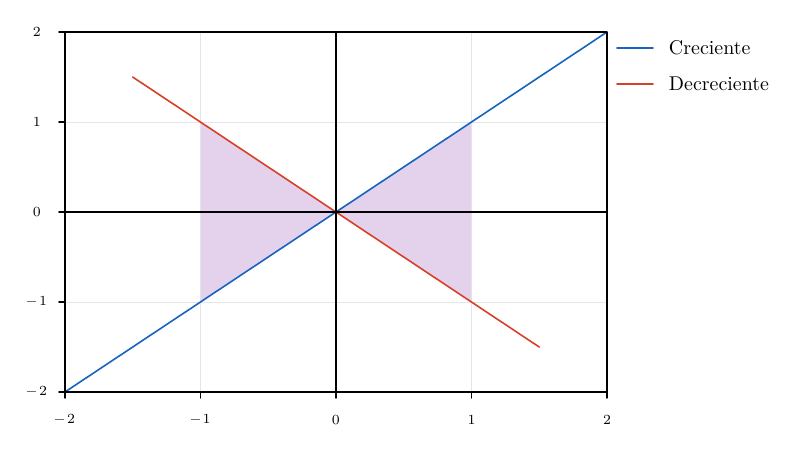
\begin{noctiaxis}[width=420,height=260][axes=origin-box]
  \NoctiFillBetween[domain=-1:1,fill=purple,opacity=0.25]{sube}{baja}
  \NoctiPlot[id=sube,stroke=blue]{-2,-2;-0.5,-0.5;2,2}
  \NoctiPlot[id=baja,stroke=red]{-1.5,1.5;0.5,-0.5;1.5,-1.5}
  \NoctiLegend{Creciente}\NoctiLegend{Decreciente}
\end{noctiaxis}
Annotations and reference lines
\NoctiPoint[opciones]{x,y}{texto TeX}
\NoctiXLine[estilo]{x}
\NoctiYLine[estilo]{y}
XLine is vertical and YLine is horizontal; they span the data area and accept common line styles, including arrows. They neither create legend entries nor change axis limits. Outside the range, they are omitted with a diagnostic. Points are omitted together with their labels; they are not moved to the boundary. On logarithmic axes, their coordinates must be positive.
| Point parameter | Values and default | Effect and example |
|---|---|---|
stroke |
Colour; black |
Marker colour when no fill is specified. stroke=red. |
fill |
Colour or none; absent |
Alternative colour. fill=white. none reuses stroke; it does not create a hollow circle. |
opacity |
From 0 to 1; 1 |
Applies to the marker, not the TeX text. |
radius |
In (0,50] bp; 2.5 |
Radius of the filled circular marker. |
labelpos |
northeast, northwest, southeast, southwest, above, below, left, right, center, auto; northeast |
Fixed position or automatic search for each point. |
dx, dy |
From −2000 to 2000 bp; 0 |
Additional text offset; positive values move right or up. |
The marker does not use width/dash/arrow; use series markers for styles other than a circular annotation. The base distance to the text is radius + 4 bp, plus half the relevant TeX text dimension for the chosen direction. The text must fit within the canvas, although it may occupy the margins; it is not partially clipped.
With labelcollision=avoid, only labels without an explicit labelpos, dx or dy are automatic. Writing dx=0 pins the position. labelpos=auto enables a search for that point even on a manual axis; in this case, its offsets are applied to every candidate.
The search tries eight directions and additional gaps of 0, 8, 16, 32 and 48 bp, with 2 bp clearance from obstacles. It reserves fixed labels first, then automatic labels in order. It considers titles, ticks, legends, contour labels and other annotated points, but does not avoid curves or every series marker. At most 256 annotations are allowed per axis when automatic placement is used. If it finds no space, it preserves the text and issues a warning; if the text cannot fit even within the canvas, it fails.
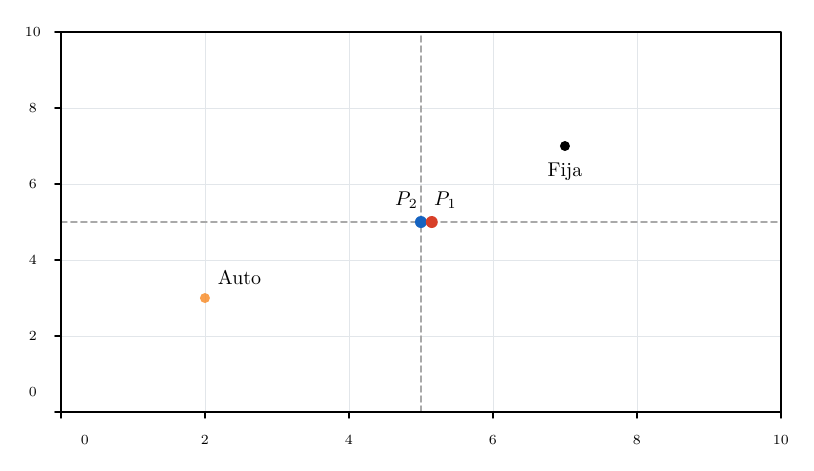
\begin{noctiaxis}[width=440,height=270]
  [xmin=0,xmax=10,ymin=0,ymax=10,axes=box,labelcollision=avoid]
  \NoctiXLine[stroke=gray,dash=3:2]{5}
  \NoctiYLine[stroke=gray,dash=3:2]{5}
  \NoctiPoint[stroke=blue,radius=3]{5,5}{$P_1$}
  \NoctiPoint[stroke=red,radius=3]{5.15,5}{$P_2$}
  \NoctiPoint[labelpos=below,dx=0,dy=-2]{7,7}{Fija}
  \NoctiPoint[labelpos=auto,fill=orange,opacity=0.8]{2,3}{Auto}
\end{noctiaxis}
Panels and scientific composition
\begin{noctipanels}[dimensiones][configuración de rejilla]
  \begin{noctipanel}[opciones de eje]
    series, etiquetas y anotaciones
  \end{noctipanel}
  ... exactamente rows * columns paneles
\end{noctipanels}
| Parameter | Values and default | Effect and example |
|---|---|---|
width, height |
Physical canvas in bp | Without the first list: 500 × 420. With an explicit list, omitted dimensions revert to the base 320 × 200. Specify both. |
rows, columns |
Positive integers; at most 16 cells | Without the second list: rows=2,columns=2. With an explicit list, omitted values: rows=1,columns=2. Specify both. |
gap |
From 0 to 100 bp; 12 |
Gap between cells. gap=16. |
share |
none, x, y, both; none |
Shares explicit limits for the selected axes. |
xmin, xmax |
Required when sharing X | Increasing limits; permitted in the grid only if share=x/both. |
ymin, ymax |
Required when sharing Y | Same contract with share=y/both. |
Panels are arranged by row, starting at the top left. Each cell must measure at least 150 × 140 bp and leave sufficient usable space. All panels require aspect=auto; shared axes must be linear. A panel may repeat an identical shared limit but may not contradict it. No global automatic range is calculated, and inner ticks are not hidden.
Margins are measured first, then the maximum on each side is used to align the plot areas. Both passes consume the point budget. Text and its identifiers are retained across the whole figure. The grid accepts panels and declarations resolved beforehand, such as styles; do not nest figures, panels or grids.
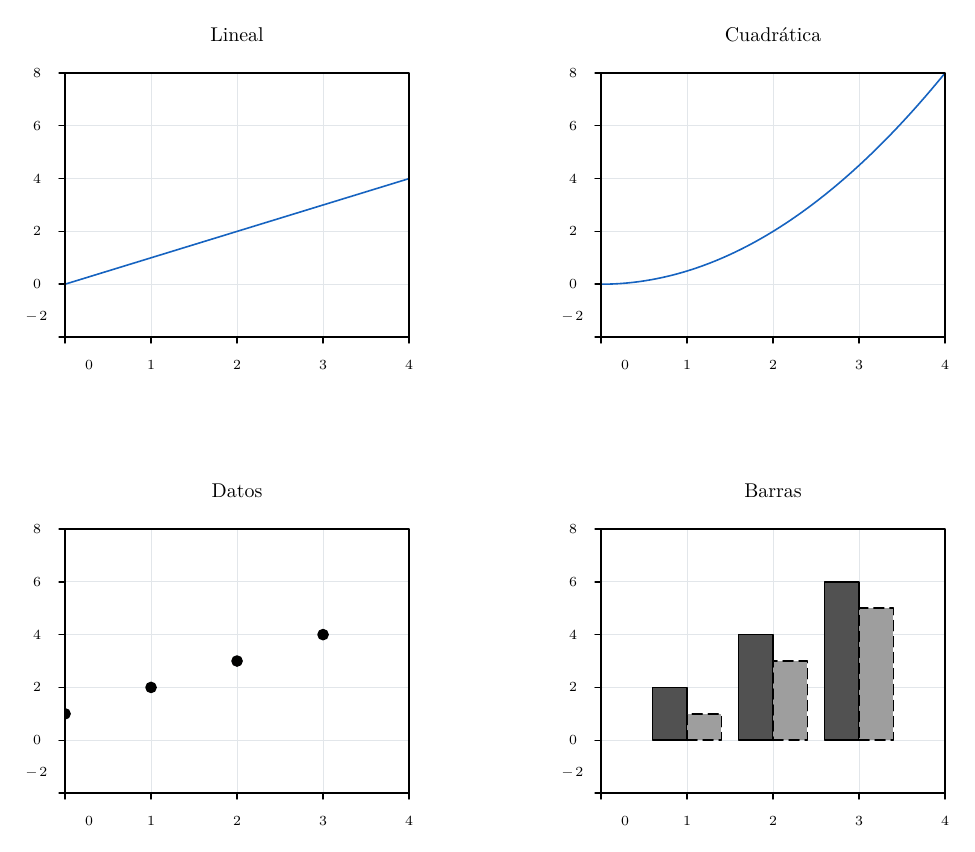
\begin{noctipanels}[width=520,height=440]
  [rows=2,columns=2,gap=16,share=both,xmin=0,xmax=4,ymin=-2,ymax=8]
  \begin{noctipanel}[axes=box,palette=scientific]
    \NoctiFunction[domain=0:4]{x}\NoctiTitle{Lineal}
  \end{noctipanel}
  \begin{noctipanel}[axes=box,palette=scientific]
    \NoctiFunction[domain=0:4]{x^2/2}\NoctiTitle{Cuadrática}
  \end{noctipanel}
  \begin{noctipanel}[axes=box,palette=gray]
    \NoctiPlot[kind=scatter]{0,1;1,2;2,3;3,4}\NoctiTitle{Datos}
  \end{noctipanel}
  \begin{noctipanel}[axes=box,palette=gray,bars=grouped]
    \NoctiPlot[kind=bar]{1,2;2,4;3,6}
    \NoctiPlot[kind=bar]{1,1;2,3;3,5}\NoctiTitle{Barras}
  \end{noctipanel}
\end{noctipanels}
Layer order in a plot
Layers are arranged to keep data and text legible: scalar field; rectangular regions; bands; FillUnder/Riemann; grid and reference lines; series; axes and frame; annotation segments/vectors; open and closed endpoints; point markers; legend geometry. LaTeX text is placed above the geometry. The scalar field has its own contour and label placement logic; its text acts as an obstacle for automatic annotations.
Placing a decoration at the end of the source does not change this order. Equivalent layers retain the applicable declaration order. Internal legends can cover geometry, including markers; for a crowded figure, move them, enlarge the canvas or use separate panels.
Vectors, segments and vector operations
The commands in this section are used inside noctiaxis or noctipanel. Positions and components are in axis data units. By contrast,
width and dash are expressed in bp, as in general drawing styles. To represent Cartesian directions, angles and lengths faithfully, use two linear scales and aspect=equal.
Segments between points and vectors from components
\NoctiSegment[opciones]{x0,y0}{x1,y1}
\NoctiVector[opciones]{x0,y0}{ux,uy}
| Argument | Type and meaning | Restrictions |
|---|---|---|
{x0,y0} |
Initial point or vector origin. | Two numbers or supported scalar expressions, separated by a comma. |
{x1,y1} in NoctiSegment |
Absolute endpoint. | Same units as the axis. |
{ux,uy} in NoctiVector |
Displacement from the origin. | The calculated endpoint is (x0+ux,y0+uy). |
NoctiVector{1,1}{2,3} ends at (3,4).
NoctiSegment{1,1}{2,3} ends at (2,3). Numerical arguments can reuse constants declared with
NoctiConstant; they are not places for mathematical TeX text. Every coordinate and calculated endpoint must be finite and satisfy
abs(valor)<=1e12.
| Option | Default | Type, values and effect |
|---|---|---|
stroke |
black |
Line and arrowhead colour; a supported name or r:g:b. |
width |
0.8 |
Width in bp, greater than 0 and at most 100. |
dash |
Solid | Up to 8 positive lengths, each at most 1000 bp, separated by :; for example 4:2. |
arrow for segments |
none |
none, end or both. |
arrow for vectors |
end |
The same options; an explicit value takes precedence. |
opacity |
1 |
Number between 0 and 1. |
fill |
No fill | Accepted style key; these are open paths, so it does not fill an area. Arrowheads use stroke. |
\begin{noctiaxis}[width=430,height=300]
  [xmin=0,xmax=4,ymin=0,ymax=5,axes=origin-box,aspect=equal]
  \NoctiSegment[stroke=gray,dash=4:2]{1,1}{2,3}
  \NoctiVector[stroke=blue,width=1.5]{1,1}{2,3}
  \NoctiVector[stroke=red,arrow=both,opacity=0.5]{1,1}{2,0}
  \NoctiPoint[labelpos=below]{1,1}{$O$}
  \NoctiPoint[labelpos=above]{3,4}{$O+u$}
\end{noctiaxis}
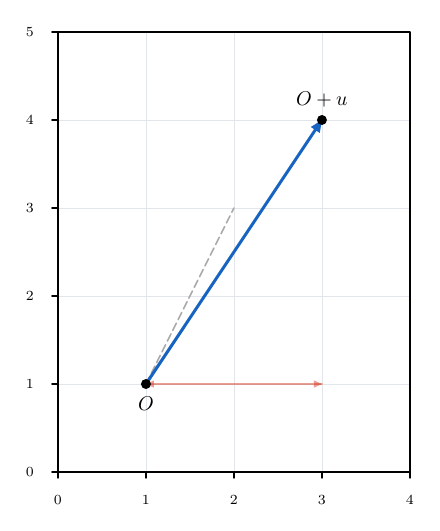
These objects neither affect automatic axis limits nor create legend entries. An axis containing only vectors needs xmin, xmax, ymin and ymax. It may also obtain its range from an ordinary series. They are drawn over the series and axes, before labelled points. They are clipped to the data area: a segment can cross the view even if both endpoints are outside. If the true arrowhead is outside, no replacement arrowhead is created at the boundary. Zero-length segments are omitted with a diagnostic.
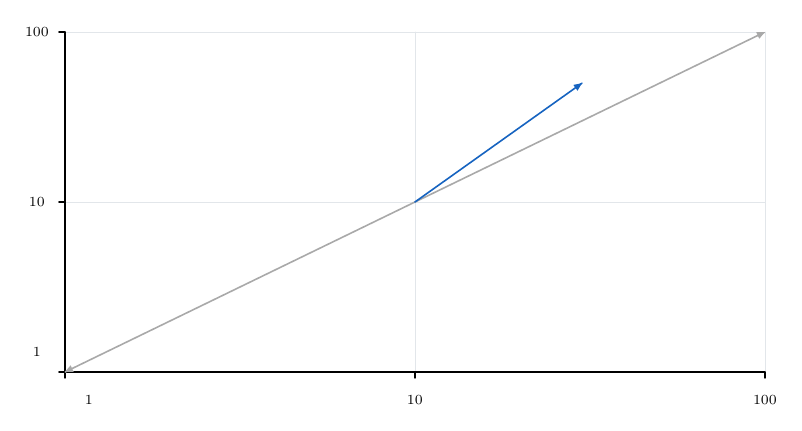
Explicit segments and vectors accept logarithmic axes if both endpoints are positive in each logarithmic dimension. Vector components are added before transformation. The visible result joins the transformed endpoints with a straight line; it is not a sampled curved path.
\begin{noctiaxis}[width=430,height=250]
  [xmin=1,xmax=100,ymin=1,ymax=100,xscale=log,yscale=log]
  \NoctiSegment[stroke=gray,arrow=both]{1,1}{100,100}
  \NoctiVector[stroke=blue]{10,10}{20,40}
\end{noctiaxis}
Addition, projection and decomposition
\NoctiVectorSum[opciones]{origen}{u}{v}
\NoctiProjection[opciones]{origen}{u}{v}
\NoctiComponents[opciones]{origen}{u}
\NoctiDecompose[opciones]{origen}{u}{v}
All geometric arguments use pairs x,y. The origin only translates the drawing. u and v are Cartesian components, not names of previously declared vectors or absolute endpoints. These four operations require linear axes.
| Command | Calculation and geometry drawn |
|---|---|
NoctiVectorSum |
A vector from O to O+u+v. It does not draw the operands. |
NoctiProjection |
A vector from O to O+p, where p=((u·v)/(v·v))*v. |
NoctiComponents |
Two directed segments: O to O+(ux,0), then to O+u. |
NoctiDecompose |
Two directed segments: O to O+p, then to O+u; the second represents u-p. |
They accept exactly the six segment and vector style keys. Their defaults are stroke=black, width=0.8, arrow=end,
opacity=1, a solid line and no fill. In commands that produce two segments, both share the same style, and each segment receives its own arrowheads according to arrow.
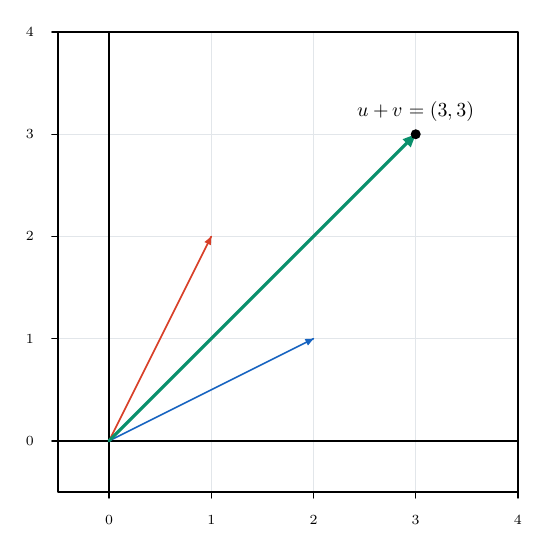
\begin{noctiaxis}[width=430,height=310]
  [xmin=-0.5,xmax=4,ymin=-0.5,ymax=4,axes=origin-box,aspect=equal]
  \NoctiVector[stroke=blue]{0,0}{2,1}
  \NoctiVector[stroke=red]{0,0}{1,2}
  \NoctiVectorSum[stroke=green,width=1.6]{0,0}{2,1}{1,2}
  \NoctiPoint[labelpos=above]{3,3}{$u+v=(3,3)$}
\end{noctiaxis}
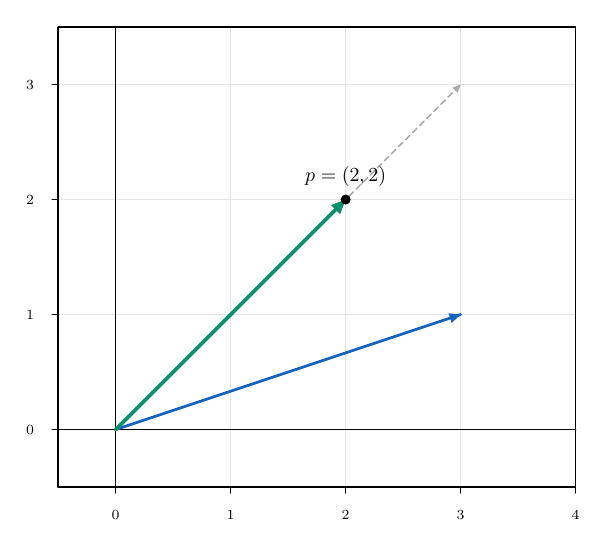
\begin{noctiaxis}[width=430,height=310]
  [xmin=-0.5,xmax=4,ymin=-0.5,ymax=3.5,axes=origin-box,aspect=equal]
  \NoctiVector[stroke=blue,width=1.4]{0,0}{3,1}
  \NoctiVector[stroke=gray,dash=3:2]{0,0}{3,3}
  \NoctiProjection[stroke=green,width=1.8]{0,0}{3,1}{1,1}
  \NoctiPoint[labelpos=above]{2,2}{$p=(2,2)$}
\end{noctiaxis}
\begin{noctiaxis}[width=430,height=310]
  [xmin=-0.5,xmax=4,ymin=-0.5,ymax=3.5,axes=origin-box,aspect=equal]
  \NoctiVector[stroke=blue]{0,0}{3,1}
  \NoctiComponents[stroke=gray,dash=3:2]{0,0}{3,1}
  \NoctiDecompose[stroke=orange,width=1.3]{0,0}{3,1}{1,1}
  \NoctiPoint[labelpos=above]{2,2}{$p$}
  \NoctiPoint[labelpos=right]{3,1}{$u=p+(u-p)$}
\end{noctiaxis}
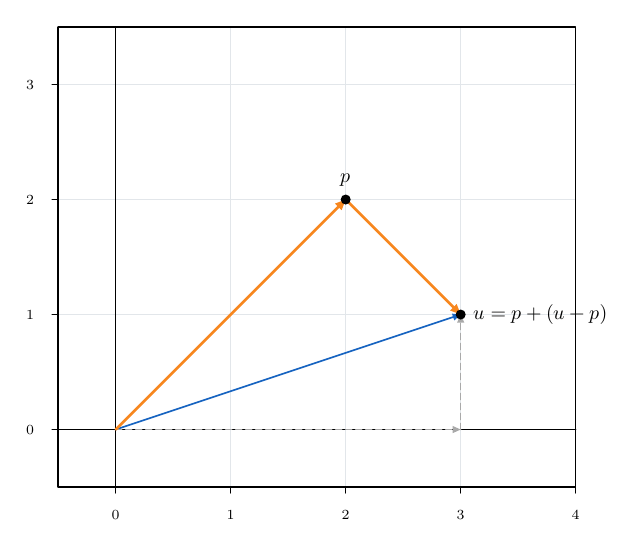
For u=(3,1) and v=(1,1), the projection is (2,2) and the residual is (1,-1). Replacing v with any non-zero multiple, including a negative one, preserves the projection. Projecting onto (0,0) produces an error. A zero-length component or projection is omitted with a diagnostic. Intermediate results must respect the numerical limit, just like the endpoints of an explicit vector. No labels, TeX variables or symbolic results are generated; add labels with NoctiPoint when needed.
Vector fields
\NoctiVectorField[opciones]{u(x,y)}{v(x,y)}
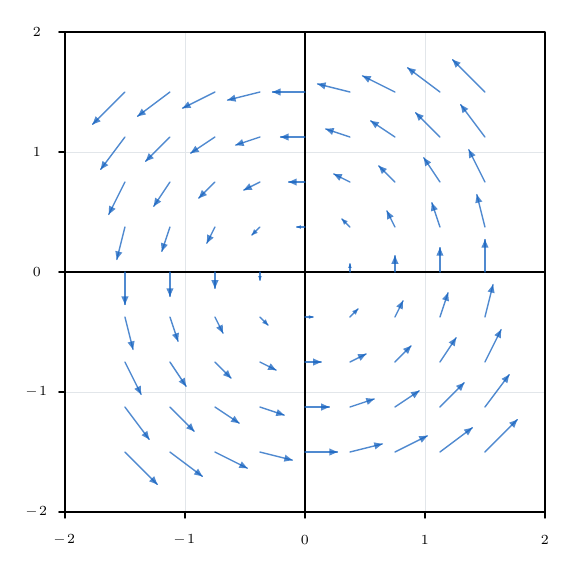
The command evaluates two scalar expressions on a rectangular grid and draws a vector at each valid point. The required arguments are the Cartesian field components. They accept the variables x, y, the evaluator's operators and functions, and constants declared in the current scope.
| Option | Default | Type, unit, values and effect |
|---|---|---|
xdomain |
Required | Increasing interval a:b in X units; includes both endpoints. Independent of xmin/xmax. |
ydomain |
Required | Increasing interval c:d in Y units; includes both endpoints. Independent of ymin/ymax. |
nx |
11 |
Integer from 2 to 51; number of uniformly spaced points in X. |
ny |
11 |
Integer from 2 to 51; number of uniformly spaced points in Y. |
scale |
0.2 |
Positive, finite factor, at most 1e12; multiplies the components before adding them to the origin point. |
normalize |
false |
true or false; normalises the non-zero vector before applying scale. |
stroke |
blue |
Colour of each vector and its arrowhead. |
width |
0.8 |
Width in bp, greater than 0 and at most 100. |
dash |
Solid | Up to 8 positive lengths in bp, each at most 1000, separated by :. |
arrow |
end |
none, end or both. |
opacity |
1 |
Number between 0 and 1. |
fill |
No fill | Accepted as an open-path style; it does not colour a region. |
With normalize=false, the endpoint at (x,y) is
(x+scale*u(x,y),y+scale*v(x,y)). This preserves relative magnitudes. With normalize=true, the components are divided by sqrt(u*u+v*v) and all valid vectors have length scale in data coordinates. Equal length in data units appears physically correct with aspect=equal. There is no automatic adjustment to prevent arrows from overlapping.
\begin{noctiaxis}[width=430,height=320]
  [xmin=-2,xmax=2,ymin=-2,ymax=2,axes=origin-box,aspect=equal]
  \NoctiVectorField[xdomain=-1.5:1.5,ydomain=-1.5:1.5,
    nx=9,ny=9,scale=0.18,normalize=false,stroke=blue,
    width=0.7,arrow=end,opacity=0.75]{-y}{x}
\end{noctiaxis}
\begin{noctiaxis}[width=430,height=320]
  [xmin=-2,xmax=2,ymin=-2,ymax=2,axes=origin-box,aspect=equal]
  \NoctiVectorField[xdomain=-1.5:1.5,ydomain=-1.5:1.5,
    nx=7,ny=7,scale=0.25,normalize=true,stroke=gray,
    dash=2:1,arrow=none]{x}{-y}
  \NoctiPoint[labelpos=below]{0,0}{Equilibrio}
\end{noctiaxis}
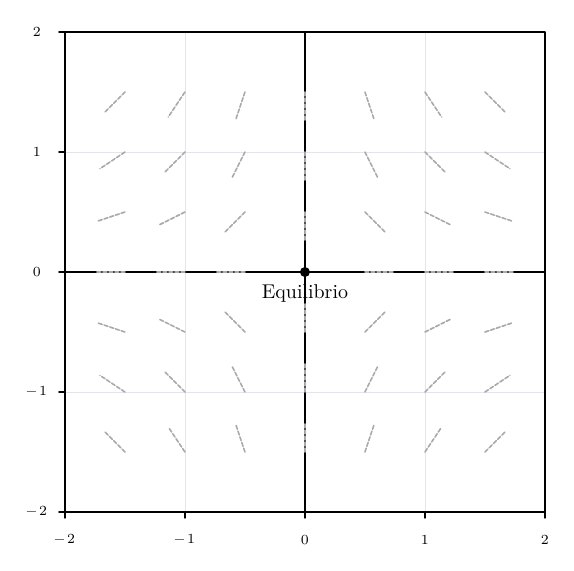
The field is only a decoration: it contributes neither automatic axis limits nor legend entries. All four axis limits or a series providing the range are required. Only linear X/Y scales are accepted. It is drawn in the segment layer, with the same clipping and arrowhead handling as explicit vectors.
Components that are undefined, non-finite or outside +/-1e12 are omitted. Zero vectors are also omitted. A diagnostic summarises both counts. However, if a valid vector produces a calculated endpoint that is non-finite or outside the numerical limits, the field fails; reduce scale or restrict the domain. Sampling outside the viewport does not change the visible limits.
At most 2601 grid points are allowed. Each requested point reserves two units of the shared figure budget, even if subsequently omitted. Arrows are not automatically coloured by magnitude. To show a magnitude in the background, combine a scalar field with the vector field.
Trajectories and streamlines
\NoctiTrajectory[opciones]{x0,y0}{u(x,y)}{v(x,y)}
\NoctiStreamline[opciones]{x0,y0}{u(x,y)}{v(x,y)}
Both commands integrate an autonomous Cartesian system from a seed:
dx/dt = u(x,y)
dy/dt = v(x,y)
The seed is a pair of numbers or supported scalar expressions. Field expressions accept x, y and constants. They do not accept an additional time variable. X/Y axes must be linear.
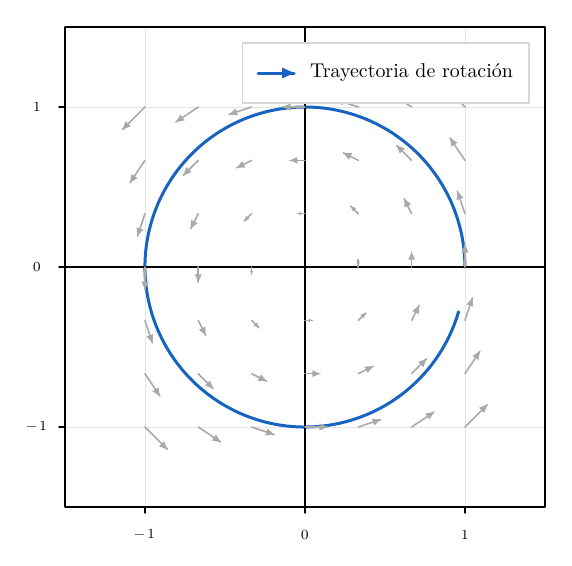
NoctiTrajectory preserves the field speed. Its parameter can represent time if the components and problem units have been defined accordingly.
NoctiStreamline normalises the field at each integration stage: its parameter approximates arc length in Cartesian data units. Normalising only the field arrows is not enough to obtain this behaviour.
| Option | Default | Type, unit, values and effect |
|---|---|---|
step |
0.02 |
Positive fixed step, greater than 0 and at most 1000. For trajectories it uses parameter units; for streamlines it approximates data length units. |
steps |
500 |
Integer from 1 to 10000; maximum number of steps per branch. |
direction |
forward |
forward, backward or both; direction of integration relative to the field. |
stroke |
black |
Line colour. |
width |
0.8 |
Width in bp, greater than 0 and at most 100. |
dash |
Solid | Up to 8 positive lengths in bp, each at most 1000, separated by :. |
arrow |
none |
none, end or both; adds arrowheads following path order. |
opacity |
1 |
Number between 0 and 1. |
fill |
No fill | Accepted as a style; these open curves do not fill areas. |
The method is classical fourth-order Runge–Kutta with a fixed step (RK4). The maximum horizon per branch is step*steps. With direction=backward a negative step is used internally, but step
is still written as a positive value. The path runs from the seed into the past. With both the backward branch is reversed and joined to the forward branch without duplicating the seed. An arrowhead follows path order, so on a backward branch it points in the direction of backward integration.
\begin{noctiaxis}[width=430,height=320]
  [xmin=-1.5,xmax=1.5,ymin=-1.5,ymax=1.5,
   axes=origin-box,aspect=equal,legendpos=topright]
  \NoctiVectorField[xdomain=-1:1,ydomain=-1:1,
    nx=7,ny=7,scale=0.14,stroke=gray]{-y}{x}
  \NoctiTrajectory[step=0.02,steps=300,direction=forward,
    stroke=blue,width=1.5,arrow=end]{1,0}{-y}{x}
  \NoctiLegend{Trayectoria de rotaci\'on}
\end{noctiaxis}
\begin{noctiaxis}[width=430,height=300]
  [xmin=0,xmax=3,ymin=0,ymax=3,axes=box,aspect=equal,
   legendpos=topright]
  \NoctiStreamline[step=0.02,steps=80,direction=both,
    stroke=red,width=1.3]{1,1}{x}{-y}
  \NoctiStreamline[step=0.02,steps=70,direction=backward,
    stroke=blue,dash=4:2,arrow=end,opacity=0.7]{2,1}{x}{-y}
  \NoctiLegend{Ambos sentidos}
  \NoctiLegend{Integraci\'on hacia atr\'as}
\end{noctiaxis}
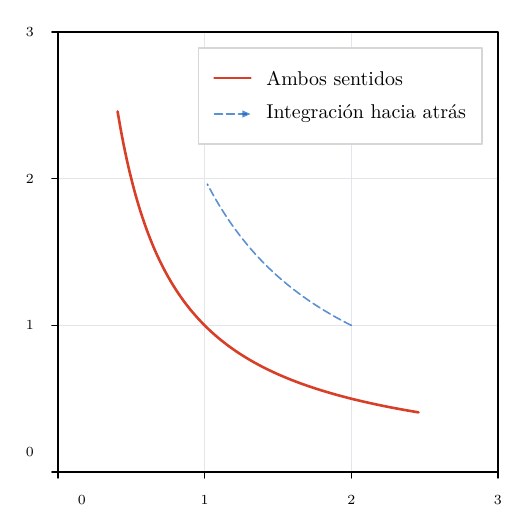
Unlike the arrow field, these curves are series: they contribute to automatic axis limits and can receive NoctiLegend. They accept exactly the options in the table; they do not accept kind, id, samples, sampling, rangesamples,
maxsamples, tolerance or normalize. The chosen command determines whether the field is normalised. The viewport clips the drawing; integration may continue beyond it. Loops are not automatically detected or closed.
Solution curves of a differential equation
An analytically known family is drawn with NoctiFunction. To approximate a first-order equation dy/dx=f(x,y), write the planar system dx/dt=1, dy/dt=f(x,y) and use NoctiTrajectory. Since x(t)=x0+t, the step here is also an increment in X. The following example compares dy/dx=x*y, y(0)=1 with its analytical solution.
\begin{noctiaxis}[width=460,height=300]
  [xmin=-2,xmax=2,ymin=0,ymax=8,axes=origin-box,
   legendpos=topleft]
  \NoctiFunction[domain=-2:2,samples=401,
    stroke=gray,width=2,dash=4:2]{exp(x*x/2)}
  \NoctiTrajectory[step=0.01,steps=200,direction=both,
    stroke=blue,width=1.1]{0,1}{1}{x*y}
  \NoctiPoint[labelpos=right]{0,1}{$y(0)=1$}
  \NoctiXLabel{$x$}\NoctiYLabel{$y$}
  \NoctiLegend{$e^{x^2/2}$}
  \NoctiLegend{RK4}
\end{noctiaxis}
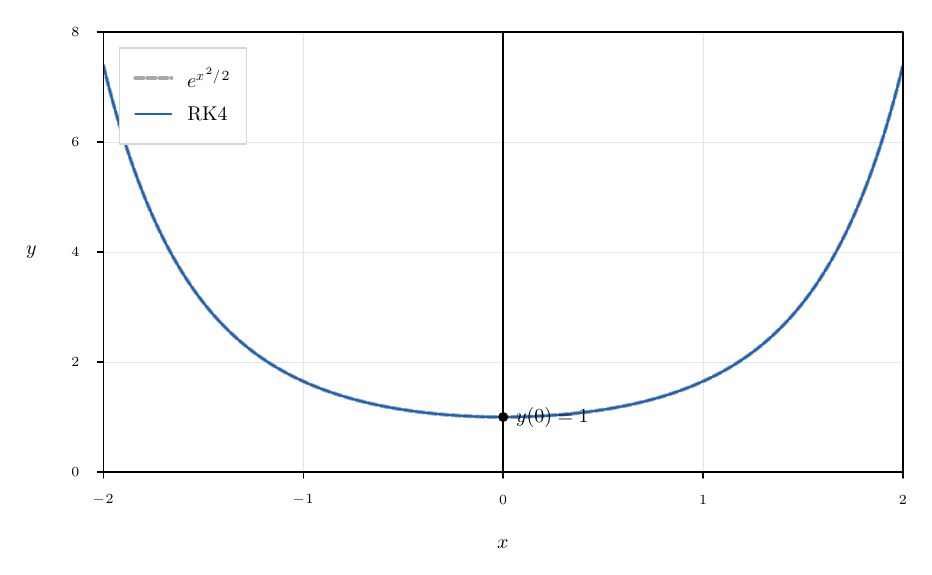
This does not provide symbolic solutions, calculation of integration constants or automatic verification of an ODE. A fixed step may be unsuitable for stiff systems or near singularities. To check numerical sensitivity, halve
step and double steps while preserving the same horizon.
Stopping conditions, budget and numerical limits
The branch retains its computed prefix and emits a diagnostic if it encounters:
- A field or intermediate stage that is undefined, non-finite or outside
+/-1e12. - An equilibrium at the current position.
- A subsequent coordinate outside the permitted limit.
- Numerical stagnation: the next point coincides with the current one.
- In
NoctiStreamline, an equilibrium at an intermediate stage.
An equilibrium seed produces only one point; no line appears. To display it, use NoctiPoint. There are no events, adaptive steps, built-in error estimates or special solvers for stiff systems. A large step may jump over a singularity.
Each requested step reserves nine budget units: eight scalar evaluations from the four stages plus one point. The full reservation is
9*steps*ramas+1, with one or two branches. It is calculated before integration, even if an equilibrium will be reached early. With the default figure budget of 100000 points, steps=10000,direction=both does not fit. Other objects and panels share the same budget.
Two-dimensional scalar fields
\NoctiScalarTable[opciones]{ruta-del-archivo}
\NoctiScalarFunction[opciones]{f(x,y)}
\NoctiColorLabel{texto TeX}
A scalar field represents a nodal value z on a rectangular Cartesian grid. It can be displayed using coloured cells, isolines or filled bands. One scalar field is allowed per axis or panel. The X/Y axes and colour scale are linear. The field contributes its spatial extent to automatic axis limits and does not occupy an entry in NoctiLegend.
Rectangular tables and column selection
Each row is a node (x,y,z), not a pixel or a cell average. Rows may appear in any order. Unique X and Y coordinates are sorted to form a Cartesian-product grid; spacing may be non-uniform. Noctiks does not turn scattered points into a grid.
| Table-only option | Default | Type, values and effect |
|---|---|---|
x |
x |
Exact header name for the X coordinate. |
y |
y |
Exact header name for the Y coordinate. |
z |
z |
Exact header name for the scalar value. |
delimiter |
comma |
comma, tab or semicolon. For scalar tables, it is not inferred from the file extension. |
The three selected columns must be distinct. Headers must be non-empty and unique; every row must have the same number of fields. The format is UTF-8, with an optional BOM, LF or CRLF line endings and quoted fields where appropriate; embedded quotation marks are doubled. Blank lines are omitted. Numerical columns contain literals, including scientific notation; they do not contain expressions or constant names. Duplicate coordinates (x,y) are not allowed, even when their Z values agree.
\begin{filecontents*}{noctiks-manual-temperatura.csv}
posx,posy,temperatura
0,0,10
1,0,20
0,1,15
1,1,30
\end{filecontents*}
\begin{noctiaxis}[width=460,height=290][axes=box,grid=none]
  \NoctiScalarTable[x=posx,y=posy,z=temperatura,
    delimiter=comma,mode=heat]{noctiks-manual-temperatura.csv}
  \NoctiXLabel{$x$ (m)}\NoctiYLabel{$y$ (m)}
  \NoctiColorLabel{$T$ (${}^\circ$C)}
\end{noctiaxis}
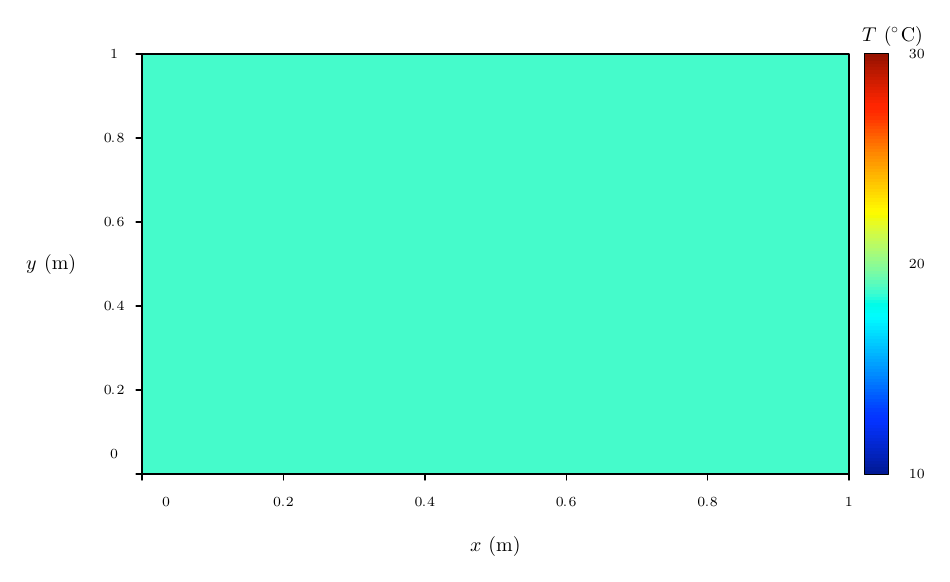
In this single-cell grid, mode=heat,shading=flat paints the cell with the mean value (10+20+15+30)/4=18.75. The bar retains the automatic nodal range 10:30.
\begin{filecontents*}{noctiks-manual-campo-semicolon.csv}
x;y;z
0;0;0
2;0;2
0;1;1
2;1;3
\end{filecontents*}
\begin{noctiaxis}[width=440,height=270][axes=box,grid=none]
  \NoctiScalarTable[delimiter=semicolon,mode=filled,
    levels=0.5:1.5:2.5,colormap=sequential]
    {noctiks-manual-campo-semicolon.csv}
\end{noctiaxis}
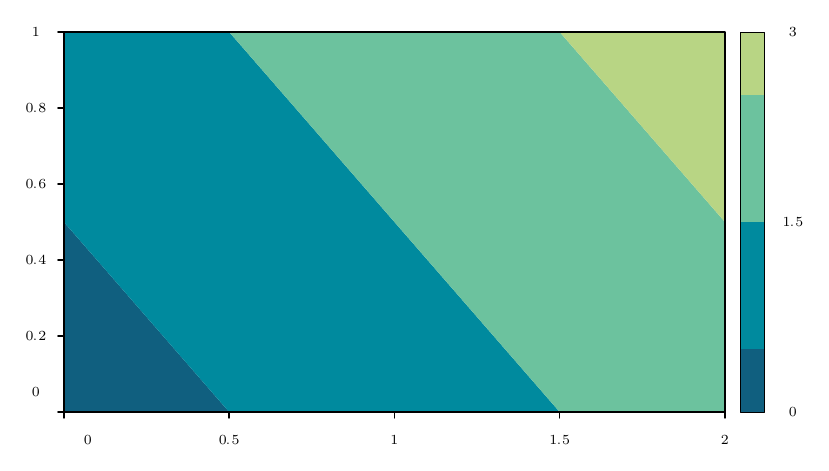
For TSV, use delimiter=tab and real tab characters in the file. The path must be project-relative, with no empty components, ., .., backslashes, :, absolute paths or URLs. The file must be available among the project resources. Compile again after changing the data.
Functions of two variables
| Function-only option | Default | Type, unit, values and effect |
|---|---|---|
xdomain |
Required | Increasing interval a:b, in X units. |
ydomain |
Required | Increasing interval c:d, in Y units. |
nx |
31 |
Integer from 2 to 201; uniformly spaced nodes in X, including the endpoints. |
ny |
31 |
Integer from 2 to 201; uniformly spaced nodes in Y, including the endpoints. |
The required argument is an expression in x and y with the evaluator's functions and constants. The sampling domain is independent of the viewport. Changing xmin/xmax does not change which nodes are evaluated. The numerical options xdomain, ydomain, nx, ny, levels, levelcount,
zmin and zmax accept constants and scalar expressions.
\begin{noctiaxis}[width=460,height=310]
  [axes=box,grid=none,aspect=equal]
  \NoctiConstant{radius}{2}
  \NoctiScalarFunction[xdomain=-radius:radius,
    ydomain=-radius:radius,nx=31,ny=31,mode=heat,
    colormap=jet,colorbar=true]{x*x+y*y}
  \NoctiColorLabel{$x^2+y^2$}
\end{noctiaxis}
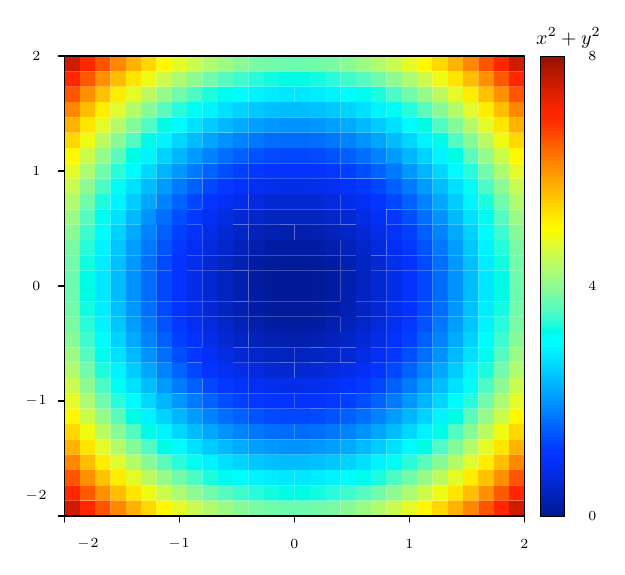
Common parameters: mode, colour, levels and contours
| Option | Default | Type, values and effect |
|---|---|---|
mode |
heat |
heat, contour or filled; selects cells, isolines or bands. |
shading |
flat |
flat or interp; interp is only accepted with mode=heat. |
levels |
Automatic | List a:b:c of 1 to 32 strictly increasing values, all strictly inside the colour range. Incompatible with levelcount. |
levelcount |
8 |
Integer from 1 to 32; generates equally spaced interior levels as an alternative to levels. |
zmin |
Minimum valid nodal value | Lower colour limit. Includes nodes outside the viewport when calculating the automatic value. |
zmax |
Maximum valid nodal value | Upper colour limit. Must exceed the lower one if either is explicitly set. |
colormap |
jet |
jet, sequential, diverging or gray. |
colorbar |
true |
true or false; shows or hides the side bar. |
contours in heat/filled |
false |
true adds isolines; false omits them. |
contours in contour |
true |
Must remain true; disabling it causes an error. |
labels |
false |
true requests one numerical label per visible level, if it fits. Requires contours=true. |
missing |
error |
error or gap; controls missing values or nodes. |
mask |
cells |
cells or triangles; controls which surface is retained beside missing nodes. |
stroke |
Depends on the mode | In contour, each level uses its palette colour when this option is omitted. For overlays on heat/filled, black when omitted. An explicit colour makes all lines the same colour. |
width |
0.8 |
Isoline width in bp, greater than 0 and at most 100. |
dash |
Solid | Up to 8 positive lengths in bp, each at most 1000, separated by :. |
These commands do not accept fill, opacity, arrow, kind or marker options. The palette colours the field. stroke, width and dash affect only the isolines; they neither draw cell boundaries nor modify the colour bar.
If the range is [a,b] and levelcount=N, the levels are
a+i*(b-a)/(N+1), for i=1,...,N. They do not include the endpoints. For example, with zmin=0,zmax=10,levelcount=4 they are 2:4:6:8. Explicit values must be distinct and strictly inside the colour range, even if not all cross the visible part of the field. Levels too close to remain numerically distinguishable cause an error.
zmin and zmax change the colour–value mapping; they neither clip the spatial domain nor delete data. Either or both may be specified; the other retains its automatic value, and the resulting pair must be increasing. Out-of-range values saturate in heat. In filled, the outer bands extend to all lower or higher values and use the colour of the first or last level. The bar reproduces these band colours.
If all valid nodes have the same value and neither limit is specified, the field is constant: the fill is uniform, automatic levels are empty, and there are no isolines. The bar displays a single central value. To impose a colour range on a constant field, use two distinct explicit limits.
Flat and interpolated heat maps
mode=heat,shading=flat colours each complete cell with the arithmetic mean of its four nodal values. If mask=triangles retains three corners, it uses the mean of those three. Each polygon has a uniform value.
mode=heat,shading=interp linearly interpolates the Z value inside each triangle, then applies the palette. Complete cells are split along the south-west to north-east diagonal. This is neither direct interpolation of the four corner colours nor bicubic interpolation.
\begin{noctiaxis}[width=460,height=310]
  [axes=box,grid=none,aspect=equal]
  \NoctiScalarFunction[xdomain=-2:2,ydomain=-2:2,
    nx=21,ny=21,mode=heat,shading=interp,
    zmin=-1,zmax=1,colormap=diverging,
    contours=true,levels=-0.5:0:0.5,stroke=black,
    width=0.6,dash=3:2]{sin(x)*cos(y)}
  \NoctiColorLabel{$f(x,y)$}
\end{noctiaxis}
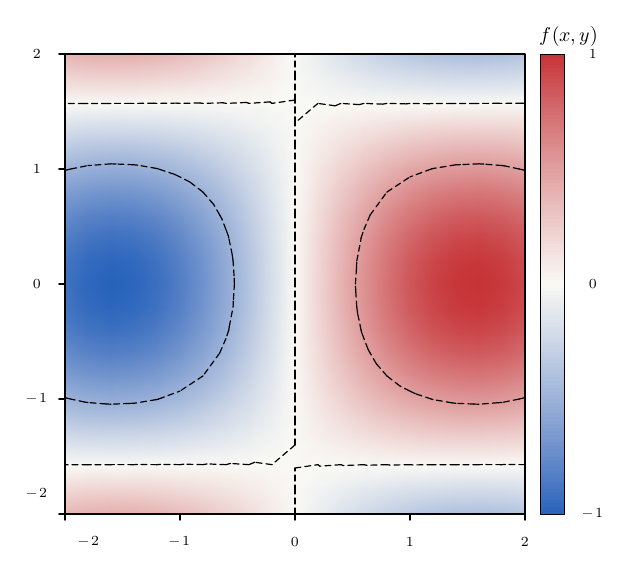
Smoothing preserves masks and colour limits; it adds no observations and does not improve the accuracy of the model or solver that produced the data. It does not smooth derivatives between triangles. The interpolated field is rasterised into a single RGBA image, at a maximum scale of 4 pixels per bp and 2048 pixels per side, using at most 16 MiB of pixel data. This avoids seams between gradients in some PDF viewers. Axes, isolines and text retain their vector or TeX representation. At high PDF zoom levels, the resolution of the interpolated map may become visible.
Contour lines and their labels
\begin{noctiaxis}[width=460,height=310]
  [axes=box,grid=none,aspect=equal]
  \NoctiScalarFunction[xdomain=-2:2,ydomain=-2:2,
    nx=41,ny=41,mode=contour,levels=0.5:1:2:3:4:5:6,
    labels=true,colormap=sequential,width=1]
    {x*x+y*y}
  \NoctiColorLabel{$x^2+y^2$}
\end{noctiaxis}
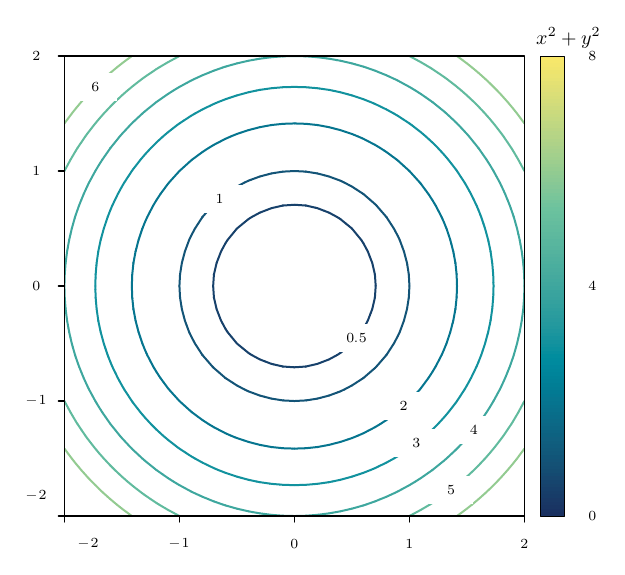
The contour mode uses the palette for line colours when stroke
is omitted. For single-colour lines, specify, for example, stroke=black.
contours=true uses exactly the same triangulation and levels when overlaying isolines on heat or filled. Isolines are segments calculated by linear interpolation inside triangles. A separate closed polyline for each contour is not guaranteed.
With labels=true, placement is attempted for at most one numerical label per visible level, choosing long segments inside the plot and avoiding overlaps with other level labels. If it does not fit, the label is omitted with a diagnostic. It does not generally avoid collisions with other curves, annotations or the grid. Custom text for individual levels is not accepted.
Filled contours and palettes
\begin{noctiaxis}[width=460,height=310]
  [axes=box,grid=none,aspect=equal]
  \NoctiScalarFunction[xdomain=-2:2,ydomain=-2:2,
    nx=31,ny=31,mode=filled,zmin=0,zmax=8,
    levelcount=7,colormap=jet,contours=true,
    labels=true,stroke=black,width=0.5]{x*x+y*y}
  \NoctiColorLabel{$r^2$}
\end{noctiaxis}
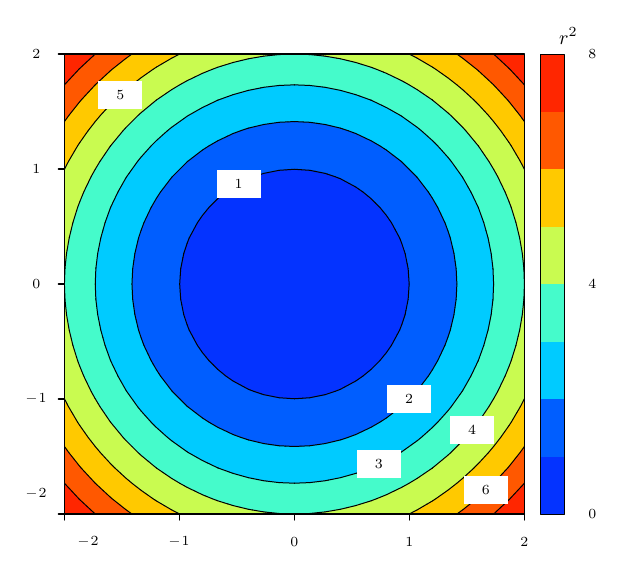
filled splits each triangle into bands between levels. Bands are grouped into vector paths before painting the PDF to reduce internal seams. At saddle points, the fixed diagonal may produce connections different from a bilinear method. Vertices exactly on a level are classified deterministically using half-open intervals; a plateau does not produce artificial interior lines.
| Palette | Appearance and use |
|---|---|
jet |
Dark blue, blue, cyan, green, yellow, red and dark red. Default. |
sequential |
Original ramp through dark blue, teal, light green and yellow. |
diverging |
Blue, white and red. White lies at the range midpoint; use symmetric limits to place it at zero. |
gray |
Dark to light grey. |
\begin{noctiaxis}[width=440,height=280][axes=box,grid=none]
  \NoctiScalarFunction[xdomain=0:1,ydomain=0:1,
    nx=11,ny=11,mode=heat,shading=interp,
    colormap=gray,zmin=0,zmax=2,colorbar=false]{x+y}
\end{noctiaxis}
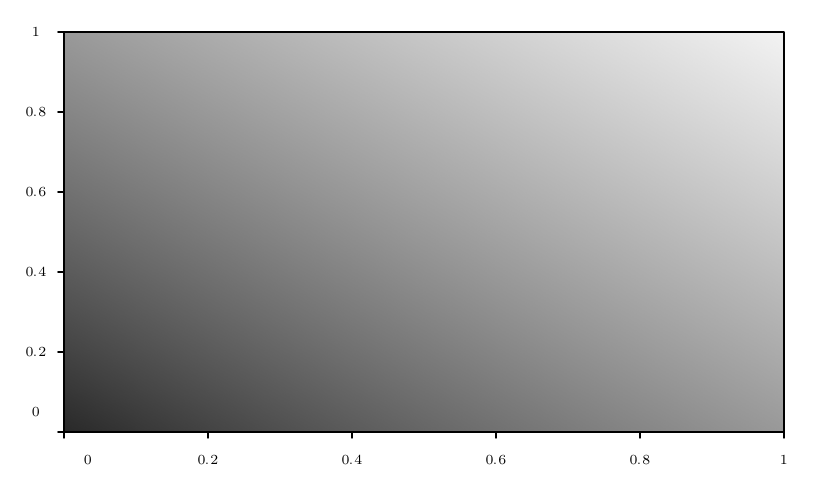
Missing values, gaps and masks
missing=error requires a complete Cartesian product and valid values.
missing=gap allows absent nodes or empty Z fields in tables; for functions, it turns undefined, non-finite or out-of-range values into missing nodes. A row's X/Y coordinates must always be valid. Writing NaN or Inf in a CSV remains an error: represent a missing value with an empty field or an absent row.
| Mask | Cell with four valid corners | Cell with three | Cell with two or fewer |
|---|---|---|---|
mask=cells |
Retained. | Entirely omitted. | Omitted. |
mask=triangles |
Retained and triangulated SW–NE. | Retains the triangle formed by the three corners. | Omitted. |
Gaps are not filled and values are not extrapolated. The triangular mask defines a specific geometric boundary; it does not infer an obstacle's true shape. At least one complete cell or valid triangle must remain. Diagnostics count cells entirely omitted because of missing corners.
\begin{filecontents*}{noctiks-manual-hueco.csv}
x,y,z
0,0,0
1,0,1
0,1,1
1,1,
2,0,2
2,1,3
\end{filecontents*}
\begin{noctiaxis}[width=440,height=280][axes=box,grid=none]
  \NoctiScalarTable[missing=gap,mask=triangles,
    mode=filled,levels=0.5:1.5:2.5,zmin=0,zmax=3,
    colormap=sequential]{noctiks-manual-hueco.csv}
\end{noctiaxis}
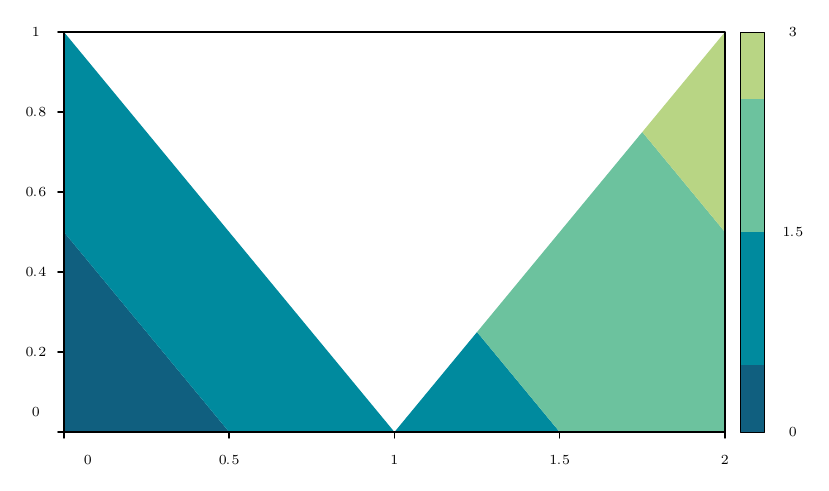
\begin{noctiaxis}[width=440,height=290]
  [axes=box,grid=none,aspect=equal]
  \NoctiScalarFunction[xdomain=-1:1,ydomain=-1:1,
    nx=21,ny=21,missing=gap,mask=cells,mode=heat,
    shading=flat,colormap=sequential]{sqrt(x+y)}
  \NoctiColorLabel{$\sqrt{x+y}$}
\end{noctiaxis}
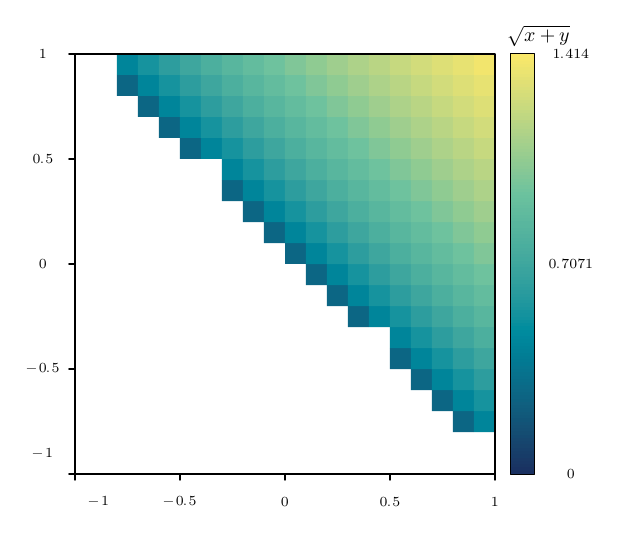
Colour bar, label and composition
colorbar=true reserves space on the right for a vertical bar. Automatic ticks show the minimum, midpoint and maximum; for a constant field, only the central value appears. There is no public option for setting individual bar ticks or their numerical format.
NoctiColorLabel{texto TeX} places a horizontal label above the bar. One is allowed per axis. It requires a scalar field with colorbar=true. The measured text must fit within 100 bp in width and 22 bp in height; use abbreviated units or a smaller TeX font size if necessary. It does not inherit isoline styles.
If series legends are also present, place them inside the plot using
legendpos, because an external right-hand legend conflicts with the bar. Legends still correspond to series; the scalar field does not occupy an entry.
\begin{noctiaxis}[width=480,height=320]
  [axes=box,grid=none,aspect=equal,legendpos=topright]
  \NoctiScalarFunction[xdomain=-2:2,ydomain=-2:2,
    nx=21,ny=21,shading=interp,colormap=sequential,
    zmin=0,zmax=3]{sqrt(x*x+y*y)}
  \NoctiVectorField[xdomain=-1.5:1.5,ydomain=-1.5:1.5,
    nx=7,ny=7,normalize=true,scale=0.18,
    stroke=gray,opacity=0.7]{-y}{x}
  \NoctiParametric[stroke=black,width=1.4,
    domain=0:6.283185307179586,samples=201]{cos(t)}{sin(t)}
  \NoctiColorLabel{$|v|$}
  \NoctiLegend{C\'irculo unidad}
\end{noctiaxis}
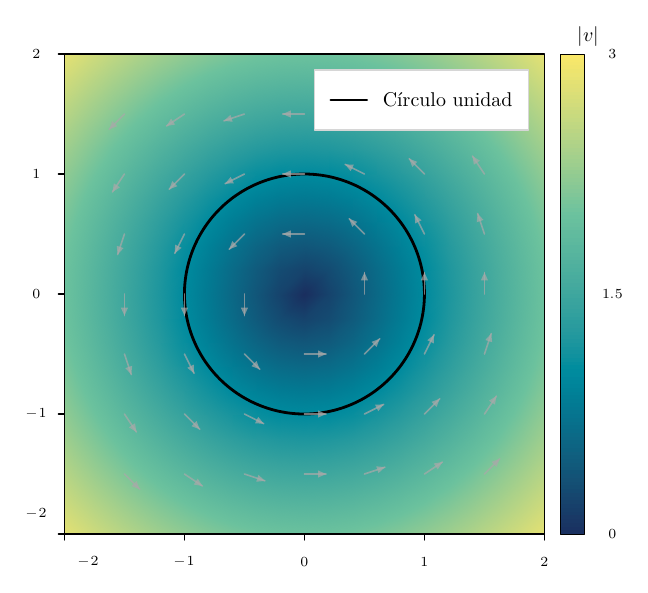
The map is drawn behind the grid, curves and annotations.
grid=none often makes a colour field easier to read. For panel comparisons, specify the same zmin, zmax and levels: automatic colour ranges are calculated separately for each field, not shared. Panels retain their shared-margin mechanism.
Data limits and scientific meaning
Each grid axis accepts between 2 and 201 coordinates. Nodes and generated vertices consume the shared point budget, which defaults to 100000 per figure. A 201 by 201 grid does not guarantee room for all its contours and polygons as well; reduce nx/ny or the number of levels. Compositions with multiple panels also consume this budget. All values and coordinates must be finite, with a magnitude at most 1e12. Table files are limited to 8000000 bytes by default; the general data reading limits still apply.
Noctiks displays data and expressions; it does not solve partial differential equations within the field. FDM, FEM or BEM results can be imported from external solvers if they already form the required grid. Unstructured triangulation, cubic interpolation, logarithmic colour scales and 3D fields are not available. A smoother drawing does not itself reduce scientific calculation error.
Geometric drawing: canvases, coordinates and primitives
The commands in this chapter are loaded with \usepackage{noctiks}. They are also available when loading noctiplots, which depends on noctiks. Each TeX example is a fragment to insert inside document, with that package loaded. Compile the document in Paper Studio to see the result.
The geometric unit is bp, equivalent to 1/72 of an inch. The origin is at the bottom-left corner; X increases to the right and Y upwards. Write a coordinate as x,y, a size as ancho,alto and a list of points as
x,y;x,y;.... Diagram geometry arguments use numeric literals; named plotting constants do not substitute values in these fields.
Environment dimensions
| Environment / parameter | Type and unit | Default | Limit and effect | Example |
|---|---|---|---|---|
noctikspicture / width |
Number, bp | 320 | 0 < width ≤ 2000; width of the TeX box and PDF |
width=400 |
noctikspicture / height |
Number, bp | 200 | 0 < height ≤ 2000; height of the box and PDF |
height=240 |
nocticontrol without [...] |
Figure alias | 460 × 240 bp | Its control commands can also be declared in noctikspicture |
\begin{nocticontrol} |
noctivenn without [...] |
Figure alias | 300 × 220 bp | Its semantic commands can also be declared in noctikspicture |
\begin{noctivenn} |
When you supply an optional argument to nocticontrol or noctivenn, it replaces the alias's default list. Missing values come from the base environment: width=320,height=200. For example, \begin{nocticontrol}[width=460]
produces 460 × 200 bp. To retain the intended height, specify both dimensions. An empty [] in either alias produces 320 × 200 bp.
The canvas does not grow automatically, and all vector geometry is clipped to its boundaries. Ordinary nodes may extend partly outside and be clipped; other APIs, including signal labels, semantic groups and Venn, reject certain overflows before drawing. Figures cannot be nested.
\begin{noctikspicture}[width=320,height=200]
  \NoctiksLine[stroke=blue,width=1.5,arrow=end]{20,30}{290,30}
  \NoctiksCircle[stroke=green,fill=0.9:0.98:0.94]{155,110}{38}
  \NoctiksLabel{155,110}{$e^{i\pi}+1=0$}
\end{noctikspicture}
Signatures and required arguments
\NoctiksLine[estilo]{inicio}{fin}
\NoctiksPolyline[estilo]{lista de puntos}
\NoctiksPolygon[estilo]{lista de vértices}
\NoctiksBezier[estilo]{inicio}{control 1}{control 2}{fin}
\NoctiksRect[estilo]{esquina inferior izquierda}{ancho,alto}
\NoctiksEllipse[estilo]{esquina inferior izquierda de la caja}{ancho,alto}
\NoctiksCircle[estilo]{centro}{radio}
\NoctiksLabel{centro}{texto TeX}
| Command / argument | Type and unit | Default | Validation and meaning | Example |
|---|---|---|---|---|
Line: start, end |
Two coordinates, bp | Required | Exactly two points; a straight segment | {20,30}{120,60} |
Polyline: points |
List x,y;..., bp |
Required | At least two points; joins consecutive points without closing the path | {20,30;70,70;120,30} |
Polygon: vertices |
List x,y;..., bp |
Required | At least three; closes automatically from the last point to the first | {20,30;70,70;120,30} |
Bezier: start, control points, end |
Four coordinates, bp | Required | Cubic Bézier; the curve does not have to pass through its two control points | {20,30}{40,90}{100,90}{120,30} |
Rect: corner |
Coordinate, bp | Required | Box origin; not its centre | {20,30} |
Rect: size |
Width,height pair, bp | Required | Both strictly positive | {90,50} |
Ellipse: corner |
Coordinate, bp | Required | Corner of its bounding box; not its centre | {20,30} |
Ellipse: size |
Width,height pair, bp | Required | Both positive; these are diameters, not radii | {90,50} |
Circle: centre |
Coordinate, bp | Required | Circle centre | {70,60} |
Circle: radius |
Number, bp | Required | Strictly positive | {25} |
Label: centre |
Coordinate, bp | Required | Placement centre of the text measured by TeX | {70,60} |
Label: text |
TeX | Required; may be empty | Measured and typeset by TeX; supports formulae and formatting | {$\alpha+\beta$} |
External numbers must be finite and have a magnitude no greater than 1e12, in addition to each argument's specific limits. Lists consume the figure's point budget; the default budget is 100,000.
The seven geometric commands accept stroke, fill, width, dash, arrow
and opacity under the common style contract. The following distinction determines the visible effect of these keys:
| Geometry | Fill | Arrows |
|---|---|---|
| Line, Polyline | fill is accepted, but the path remains open and unfilled |
end and both apply to the terminal segments |
| Polygon | fill fills the interior; the outline remains |
arrow does not add arrowheads to a closed path |
| Bezier | The cubic path is stroked; fill does not fill the curve |
Follows the direction from the last/first control point towards the endpoint |
| Rect, Ellipse, Circle | fill fills the shape; none leaves only the outline |
No arrowheads are drawn even when supplying arrow |
| Label | Does not accept vector style options | Horizontal text with the TeX formatting of its argument |
An example of each primitive, with separate coordinates to make them identifiable:
\begin{noctikspicture}[width=400,height=240]
  \NoctiksLine[stroke=blue,arrow=both]{20,200}{110,200}
  \NoctiksPolyline[stroke=orange,width=1.5]{145,180;175,215;205,180}
  \NoctiksPolygon[stroke=green,fill=0.9:0.98:0.94]{255,180;300,220;345,180}
  \NoctiksBezier[stroke=purple,arrow=end]{20,120}{45,170}{90,170}{115,120}
  \NoctiksRect[stroke=blue,fill=0.94:0.96:1]{145,100}{70,40}
  \NoctiksEllipse[stroke=red]{255,100}{90,40}
  \NoctiksCircle[stroke=green,dash=3:2]{65,45}{25}
  \NoctiksLabel{190,45}{\textbf{Texto} y $x^2+y^2$}
\end{noctikspicture}
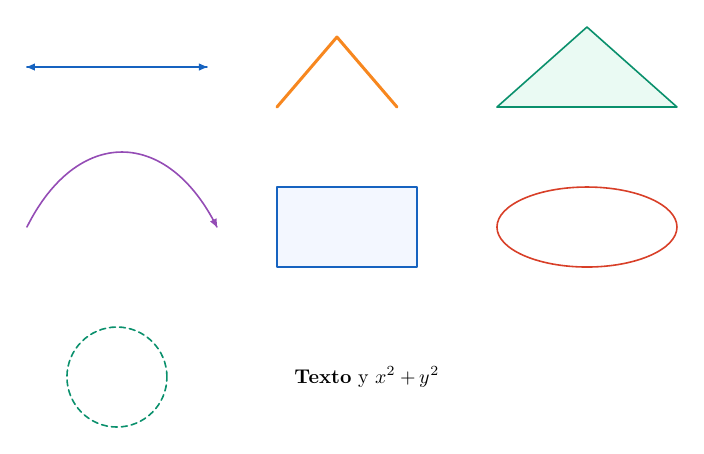
NoctiksLabel does not create a node, a background box or a connector anchor. To connect one formula to another, use NoctiksNode, which retains its measured geometry and assigns it a name.
Measured nodes, shapes and relative positioning
\NoctiksNode[opciones]{nombre}{centro}{texto TeX}
\NoctiksNodeRelative[opciones]{nombre}{texto TeX}
A node combines TeX text, an optional shape and connection anchors. Its size is calculated from the actual width and the sum of the text's height and depth. Its name must be unique and non-empty within the figure. Names without dots are recommended: anchor notation reserves the dot for nombre.ancla.
Geometry parameters
| Parameter | Type and unit | Default | Limit / effect | Example |
|---|---|---|---|---|
shape |
Enumeration | rect |
rect, circle, ellipse, diamond, none |
shape=diamond |
paddingx |
Number, bp per side | 6 | 0…1000000; horizontal space around the text |
paddingx=10 |
paddingy |
Number, bp per side | 5 | 0…1000000; vertical space around the text |
paddingy=8 |
minwidth |
Number, bp | 0 | 0…1000000; minimum outer width |
minwidth=80 |
minheight |
Number, bp | 0 | 0…1000000; minimum outer height |
minheight=36 |
nombre |
Identifier | Required | Non-empty and unique within the figure; references are case-sensitive | {controller} |
centro |
Coordinate, bp | Required for an absolute Node | May be empty only when a relation is used | {100,90} |
texto TeX |
TeX | Required; may be empty | Its measured size determines the node size; colour and typeface are controlled by TeX | {$G(s)$} |
The final width and height must be positive and no greater than 1,000,000 bp. This geometric limit does not enlarge the canvas, whose maximum remains 2000 bp per side. Empty text with zero padding and zero minimum dimensions produces zero dimensions and is invalid.
If w and h are the dimensions of the text rectangle plus padding, the shape calculates its dimensions before applying the minima:
| Shape | Outer size calculation | Consequence |
|---|---|---|
rect |
w × h |
Rectangular box enclosing the text |
none |
w × h |
The box exists for layout and anchors, but is not drawn |
circle |
Diameter sqrt(w²+h²) |
The text rectangle fits inside the circle; minimum dimensions retain a single diameter |
ellipse |
sqrt(2)*w × sqrt(2)*h |
The text rectangle fits inside the ellipse |
diamond |
2*w × 2*h |
Diamond with cardinal vertices; contains the text rectangle |
Nodes accept all six common style keys. Fill and outline do not change the TeX text. arrow does not add arrows to a node's outline; shape=none
always keeps the outline invisible, even when a fill is specified.
\begin{noctikspicture}[width=440,height=180]
  \NoctiksNode[minwidth=60,minheight=36,fill=0.94:0.96:1]{R}{55,95}{$R$}
  \NoctiksNode[shape=circle,paddingx=8,paddingy=8]{C}{140,95}{$C$}
  \NoctiksNode[shape=ellipse,fill=0.96:0.94:1]{E}{225,95}{$E$}
  \NoctiksNode[shape=diamond,paddingx=10,paddingy=7]{D}{310,95}{$D$}
  \NoctiksNode[shape=none,minwidth=50]{N}{395,95}{$N$}
  \NoctiksConnect[arrow=end]{R.east}{C.west}
  \NoctiksConnect[arrow=end]{C.east}{E.west}
  \NoctiksConnect[arrow=end]{E.east}{D.west}
  \NoctiksConnect[arrow=end]{D.east}{N.west}
\end{noctikspicture}

Connection anchors
Valid anchors are center, north, south, east, west, northeast,
northwest, southeast and southwest. They are written, for example, as G.east. Cardinal anchors touch the centre of each side; center is the node centre. Diagonal anchors intersect the actual outline in the direction of a bounding-box corner. On ellipses and diamonds, they are not the box corner. An anchor lies on the outline's centreline, with no extra offset for stroke width.
\begin{noctikspicture}[width=300,height=190]
  \NoctiksNode[shape=ellipse,minwidth=85,minheight=45]{A}{80,80}{$A$}
  \NoctiksNode[shape=diamond,minwidth=70,minheight=45]{B}{225,135}{$B$}
  \NoctiksConnect[arrow=end]{A.northeast}{B.southwest}
  \NoctiksSignal[labelside=below,labelgap=8]{A.east}{B.west}{$u$}
\end{noctikspicture}
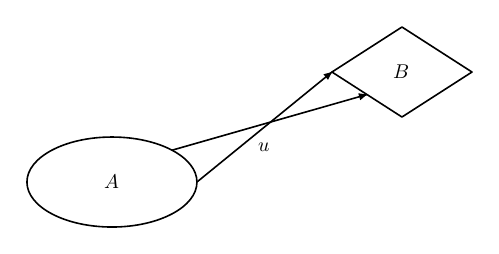
Relative positioning
NoctiksNodeRelative omits the explicit coordinate and requires exactly one relation. The reference node may appear later in the source. The gap is measured between the edges of the final boxes, including shape, padding and minimum dimensions; it is not the distance between centres.
| Parameter | Type and unit | Default | Limit / effect | Example |
|---|---|---|---|---|
rightof |
Node name | None | Places the node to the right; aligns centres along Y | rightof=A |
leftof |
Node name | None | Places the node to the left; aligns centres along Y | leftof=A |
above |
Node name | None | Places the node above; aligns centres along X | above=A |
below |
Node name | None | Places the node below; aligns centres along X | below=A |
gap |
Number, bp | 24 | 0…1000000; gap between boxes in the chosen direction |
gap=30 |
shiftx |
Number, bp | 0 | Finite, magnitude ≤ 1e12; offset applied after positioning |
shiftx=8 |
shifty |
Number, bp | 0 | Finite, magnitude ≤ 1e12; offset applied after positioning |
shifty=-5 |
Calculated centres must remain finite and have a magnitude ≤ 1e12. A relation cannot be combined with an explicit centre. gap, shiftx and
shifty require a relation. The long-form equivalent of NodeRelative
is \NoctiksNode[rightof=A]{B}{}{texto}.
\begin{noctikspicture}[width=360,height=220]
  \NoctiksNode[minwidth=55,minheight=30]{A}{170,110}{$A$}
  \NoctiksNodeRelative[rightof=A,gap=30,shiftx=8,shifty=-5]{B}{$B$}
  \NoctiksNodeRelative[leftof=A,gap=30]{C}{$C$}
  \NoctiksNodeRelative[above=A,gap=25]{D}{$D$}
  \NoctiksNodeRelative[below=A,gap=25]{E}{$E$}
  \NoctiksConnect[arrow=end]{A.east}{B.west}
  \NoctiksConnect[arrow=end]{A.west}{C.east}
  \NoctiksConnect[arrow=end]{A.north}{D.south}
  \NoctiksConnect[arrow=end]{A.south}{E.north}
\end{noctikspicture}
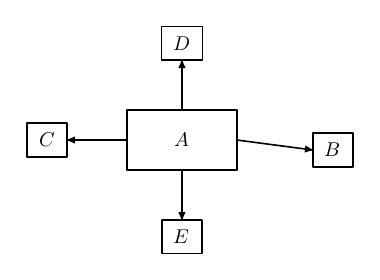
All nodes are resolved before drawing: forward references and connectors declared before their nodes are supported. Duplicate names, missing references, cycles and dependency depths greater than 128 are rejected. Every dependency chain requires an absolute root.
Positioning does not avoid collisions or enlarge the canvas. Drawing order follows declaration order, even though geometry has already been resolved. Nodes under a non-identity transformation are not supported.
Connectors and signal labels
\NoctiksConnect[opciones]{origen.ancla}{destino.ancla}
\NoctiksSignal[opciones]{origen.ancla}{destino.ancla}{texto TeX}
Connect draws a wire; Signal draws the wire and a measured label. Both take anchors of existing nodes, not free coordinates. For free endpoints, use NoctiksLine or a polyline. Control branches also expose anchors of the form sample.tap.
Routes and parameters
| Parameter | Type and unit | Default | Limit / effect | Example |
|---|---|---|---|---|
route |
Enumeration | straight |
One of the nine routes in the following table | route=hvh |
bend |
X or Y coordinate, bp | Midpoint of the endpoints | Only with hvh or vhv; sets the coordinate of the middle segment |
bend=180 |
clearance |
Number, bp | 20 | 0 < clearance ≤ 1000000; only with above, below, left, right |
clearance=35 |
arrow in Connect without [...] |
Arrow style | end, inserted by TeX |
The omitted argument is [arrow=end] |
\NoctiksConnect{A.east}{B.west} |
arrow in Connect with [...] |
Arrow style | none when the key is omitted |
The explicit list replaces the TeX default; include arrow=end to retain it |
[stroke=blue,arrow=end] |
arrow in Signal |
Arrow style | end |
Noctiks retains end even when other options are supplied; none disables it |
[stroke=blue,arrow=none] |
The remaining common style keys apply to the path. fill does not turn a connector into a filled region. bend and clearance are not interchangeable: using either key with an unrelated route produces an error.
| Route | Path from A to B | Meaning of the adjustment |
|---|---|---|
straight |
Direct segment | Does not accept bend or clearance |
hv |
Horizontal, then vertical | The corner is (Bx,Ay) |
vh |
Vertical, then horizontal | The corner is (Ax,By) |
hvh |
Horizontal, vertical, horizontal | X of the middle segment = bend or (Ax+Bx)/2 |
vhv |
Vertical, horizontal, vertical | Y of the middle segment = bend or (Ay+By)/2 |
above |
Detour above both endpoints | Y = max(Ay,By)+clearance |
below |
Detour below both endpoints | Y = min(Ay,By)-clearance |
left |
Detour to the left of both endpoints | X = min(Ax,Bx)-clearance |
right |
Detour to the right of both endpoints | X = max(Ax,Bx)+clearance |
An example with a controlled middle segment and a side return:
\begin{noctikspicture}[width=360,height=220]
  \NoctiksNode[minwidth=60,minheight=32]{A}{70,150}{$A$}
  \NoctiksNode[minwidth=60,minheight=32]{B}{285,90}{$B$}
  \NoctiksSignal[route=hvh,bend=180,stroke=blue,labelat=0.25]{A.east}{B.west}{$u$}
  \NoctiksSignal[route=below,clearance=35,labelside=below]{B.south}{A.south}{$y$}
\end{noctikspicture}
To try each route without superimposing nine wires, replace the example's first connector with just one of these option lists: route=straight,
route=hv, route=vh, route=hvh,bend=180, route=vhv,bend=110,
route=above,clearance=25, route=below,clearance=25,
route=left,clearance=25 or route=right,clearance=25.
Identical consecutive vertices are removed. Arrowheads follow the last non-zero segment, so an orthogonal route may end with a vertical or horizontal arrowhead. Side clearance is measured from the wire endpoints, not from the set of obstacles or all nodes in the figure.
Label-specific parameters
| Parameter | Type and unit | Default | Limit / effect | Example |
|---|---|---|---|---|
labelat |
Length fraction | 0.5 | 0…1; position along the total polyline length |
labelat=0.7 |
labelside |
Page direction | above |
above, below, left, right; independent of the wire's inclination |
labelside=below |
labelgap |
Number, bp | 4 | Non-negative and magnitude ≤ 1e12; gap from the reference point to the text edge |
labelgap=8 |
labeldx |
Number, bp | 0 | Finite, magnitude ≤ 1e12; additional rightward offset when positive |
labeldx=6 |
labeldy |
Number, bp | 0 | Finite, magnitude ≤ 1e12; additional upward offset when positive |
labeldy=-3 |
The initial offset adds half the text width on the left/right, or half its measured height above/below. It then applies
labeldx and labeldy. Glyphs are not rotated. The label's full rectangle must fit inside the canvas; a zero-length signal cannot have a label.
\begin{noctikspicture}[width=360,height=160]
  \NoctiksNode[minwidth=55,minheight=30]{A}{65,85}{$A$}
  \NoctiksNode[minwidth=55,minheight=30]{B}{295,85}{$B$}
  \NoctiksSignal[stroke=blue,labelat=0.7,labelside=below,labelgap=8,labeldx=6,labeldy=-3]{A.east}{B.west}{$u(t)$}
\end{noctikspicture}

NoctiksConnect does not accept label... keys. Labels on Signal are not supported under non-identity transformations. There is no automatic port selection, obstacle avoidance or label collision prevention: choosing routes, anchors and offsets is part of composing the figure.
Graphics groups, transformations and clipping
\begin{noctiksgroup} ... \end{noctiksgroup}
\NoctiksTransform{a,b,c,d,tx,ty}
\NoctiksClip{esquina inferior izquierda}{ancho,alto}
noctiksgroup saves the graphics state and restores it when the group closes. It does not draw a frame or assign a name. It differs from NoctiGroup, which calculates a semantic background around control nodes.
| Parameter / operation | Type and unit | Default | Limit / effect | Example |
|---|---|---|---|---|
| Group depth | Number of nested groups | 0 | Maximum 32; unmatched closures fail | Two nested groups |
a,b,c,d |
Matrix coefficients | No implicit value | All six coefficients are required; scaling, rotation, reflection or shear | 0,1,-1,0 |
tx,ty |
Translation, bp | No implicit value | Last two coefficients | 20,30 |
| Determinant | a*d-b*c |
— | Its absolute value must exceed 1e-12; singular matrices fail |
Identity: 1 |
| Accumulated matrix | Six coefficients | Initially the identity | All finite, with magnitude ≤ 1e8 |
1,0,0,1,20,30 |
| Clip: corner | Coordinate, bp in the current coordinate system | Required | Origin of the clipping rectangle | {10,10} |
| Clip: size | Positive pair, bp | Required | Width and height strictly positive | {130,90} |
The transformation satisfies x'=a*x+c*y+tx and y'=b*x+d*y+ty. In a sequence of transformations, the most recent acts first on local coordinates. To translate an enlarged shape, specify the translation and then the scale in the source. The parent group is applied after the child group's local transformation.
\begin{noctikspicture}[width=320,height=200]
  \begin{noctiksgroup}
    \NoctiksTransform{1,0,0,1,25,25}
    \NoctiksTransform{1.3,0,0,1.3,0,0}
    \NoctiksPolygon[fill=0.94:0.96:1,stroke=blue]{0,0;80,0;40,75}
    \NoctiksLabel{40,30}{$T$}
  \end{noctiksgroup}
  \begin{noctiksgroup}
    \NoctiksTransform{0,1,-1,0,250,40}
    \NoctiksRect[stroke=purple,fill=0.97:0.94:1]{0,0}{90,45}
  \end{noctiksgroup}
\end{noctikspicture}
The centre of NoctiksLabel is transformed; glyphs retain their orientation and size. Clipping affects vector geometry and does not partially clip the TeX overlay text. Measured nodes cannot be used under non-identity matrices. Control and Venn declarations require figure scope.
The clip is fixed in the coordinate system in effect when it is invoked. The example fixes it before translating the polygon:
\begin{noctikspicture}[width=230,height=150]
  \begin{noctiksgroup}
    \NoctiksClip{20,20}{150,100}
    \NoctiksTransform{1,0,0,1,35,25}
    \NoctiksPolygon[fill=0.9:0.95:1,stroke=blue]{0,0;170,0;85,140}
  \end{noctiksgroup}
  \NoctiksRect[stroke=gray,dash=3:2]{20,20}{150,100}
\end{noctikspicture}
Transform and Clip outside a group produce an error. Closing the group restores the previous matrix and clip. The mandatory canvas clip always remains in effect.
Control diagrams: blocks, chains and feedback
The control commands position nodes using their TeX measurements, draws connections and records summing-junction input signs. It represents the diagram; transfer functions written in blocks are labels, without calculating time responses, stability, Bode or Nyquist plots, or control algebra.
\begin{nocticontrol}[width=460,height=240] ... \end{nocticontrol}
\NoctiInput[opciones]{nombre}{texto TeX}
\NoctiOutput[opciones]{nombre}{texto TeX}
\NoctiBlock[opciones]{nombre}{texto TeX}
\NoctiSum[opciones]{nombre}
\NoctiChain[opciones]{nodo -> nodo -> ...}
\NoctiFeedback[opciones]{fuente}{sumador}
\NoctiBranch[opciones]{nombre de rama}{origen de cable}{destino de cable}
\NoctiChainLabel[opciones]{origen de cable}{destino de cable}{texto TeX}
\NoctiGroup[opciones]{nombre de grupo}{nodo -> nodo -> ...}{título TeX}
\NoctiConnect[opciones]{origen.ancla}{destino.ancla}
Control primitives
| Command | Text | Fixed shape | Default minimum dimensions | Default fill |
|---|---|---|---|---|
NoctiInput |
Required | none, invisible rectangular box |
0 × 0 bp | None |
NoctiOutput |
Required | none, invisible rectangular box |
0 × 0 bp | None |
NoctiBlock |
Required | rect |
60 × 32 bp | white |
NoctiSum |
Empty; no text argument | circle |
Diameter 18 bp | white |
The actual measurement plus padding may exceed these minima. Input and Output have padding even though their boxes are invisible. Sum is an empty circle: signs are placed beside its input ports, not as central text.
| Parameter | Type and unit | Default | Limit / effect | Example |
|---|---|---|---|---|
paddingx |
Number, bp per side | 6 | 0…1000000; measured-node contract |
paddingx=10 |
paddingy |
Number, bp per side | 5 | 0…1000000; measured-node contract |
paddingy=8 |
minwidth |
Number, bp | Depends on the primitive | 0…1000000; replaces the minimum in the previous table |
minwidth=85 |
minheight |
Number, bp | Depends on the primitive | 0…1000000; preserves a circular shape for Sum |
minheight=38 |
westinput |
+ or - |
Chain sign when omitted | Sum only; overrides the sign of its left input from Chain | westinput=- |
stroke, fill, width, dash, arrow, opacity |
Common style | Black, 0.8 bp, solid, no arrow, opacity 1; fill depends on the primitive | The shape does not use arrowheads; text retains its TeX formatting | stroke=blue,fill=0.94:0.96:1 |
These primitives do not accept shape; the command determines the shape. They also do not accept coordinates or relations such as rightof: their position must be assigned through Chain or, for a return Block, through Feedback with via.
Horizontal chains
NoctiChain takes between 2 and 128 distinct names separated by ->. It places the first at (x,y) and the others to its right, with a gap gap between measured boxes. It connects east to west and draws signs for Sum nodes receiving an input from the left.
| Parameter | Type and unit | Default | Limit / effect | Example |
|---|---|---|---|---|
| Node list | Identifiers separated by -> |
Required | 2…128 distinct nodes; all declared as control primitives | {r -> error -> G -> y} |
gap |
Number, bp | 32 | 0…1000000; gap between measured edges |
gap=50 |
x |
Number, bp | 40 | Finite, magnitude ≤ 1e12; centre of the first node |
x=35 |
y |
Number, bp | 65% of the figure height | Finite, magnitude ≤ 1e12; vertical centre of the chain |
y=160 |
sign |
+ or - |
+ |
Left input of each Sum, unless overridden by its local westinput setting |
sign=- |
| Common style | Line options | Arrow end; otherwise standard defaults |
Applies to wires, not boxes | stroke=blue,width=1.2 |
A control node belongs to exactly one Chain or, if it is a Block, exactly one
via list. Declaring a node without assigning it a position produces an error. There may be several separate chains with independent positions. Node and chain references do not depend on declaration order.
\begin{nocticontrol}[width=460,height=240]
  \NoctiInput{r}{$r$}
  \NoctiSum{error}
  \NoctiBlock[paddingx=10,paddingy=8,minwidth=85,minheight=38,stroke=blue,fill=0.94:0.96:1]{G}{$\displaystyle\frac{K}{s+1}$}
  \NoctiOutput{y}{$y$}
  \NoctiChain[gap=50,x=35,y=160,sign=+,stroke=blue,width=1.2]{r -> error -> G -> y}
  \NoctiFeedback{y}{error}
\end{nocticontrol}
Direct feedback and signs
NoctiFeedback connects a source distinct from the destination to a Sum. From an ordinary control node, it leaves from east. When the source is Output, it leaves from output.tap, the midpoint of its incoming wire, and preserves the original arrow beyond the branch point. When the source is a named branch, it uses its .tap.
| Parameter | Type and unit | Default | Limit / effect | Example |
|---|---|---|---|---|
fuente |
Control node or branch name | Required | Distinct from the destination Sum; Output requires an incoming Chain wire | {y} or {sample} |
sumador |
Sum name | Required | Must exist; other primitive types are rejected | {error} |
side |
below or above |
below |
Below enters through south; above through north |
side=above |
sign |
+ or - |
- |
Sign beside the input port | sign=+ |
clearance |
Number, bp | 45 | 0 < clearance ≤ 1000000; without via, measured from the return endpoints |
clearance=35 |
via |
List of Blocks separated by -> |
No return blocks | 1…128 distinct blocks; signal travels from right to left | via=H -> K |
| Common style | Line options | Arrow end; otherwise standard defaults |
Style of the return segments | stroke=red,dash=4:2 |
Two connections cannot enter the same port of the same Sum. This check is shared by Chain, Feedback and NoctiConnect. A Sum may receive one input at west, another at north and another at south.
\begin{nocticontrol}[width=460,height=240]
  \NoctiInput{r}{$r$}
  \NoctiSum[westinput=-]{error}
  \NoctiBlock{G}{$G(s)$}
  \NoctiOutput{y}{$y$}
  \NoctiChain[gap=55,x=40,y=85,sign=+]{r -> error -> G -> y}
  \NoctiFeedback[side=above,clearance=35,sign=+,stroke=red,dash=4:2]{y}{error}
\end{nocticontrol}
In this case, the left input is negative because of westinput=-, and the upper input is positive because of Feedback[sign=+]. The options change the signs drawn; they do not transform the formulae written in the block.
Named branches and feedback with blocks
NoctiBranch creates a black junction dot, 3 bp in diameter, on an existing Chain wire, without duplicating the wire or its arrow. The dot has no colour or size options of its own. Both endpoints must be neighbours in the same chain and appear in the same directed order.
| Parameter | Type and unit | Default | Limit / effect | Example |
|---|---|---|---|---|
| Branch name | Identifier | Required | Non-empty, without ., and unique across branches and nodes |
{sample} |
| Source, destination | Names of neighbouring Chain nodes | Required | Directed wire with positive length | {G}{y} |
pos |
Length fraction | 0.5 | Strictly 0 < pos < 1; excludes endpoints |
pos=0.7 |
In Feedback, use {sample}; in Connect or Signal, use {sample.tap}. The junction dot is drawn even if the branch does not yet have an additional connection.
Blocks listed in via are declared with NoctiBlock but are not included in Chain. They are arranged from the source towards the Sum, right to left, with equal gaps between boxes. Each gap must be at least 12 bp. If they do not fit, increase the main chain gap or reduce the block widths.
With via, the source must be to the right of the Sum, and both must belong to chains, directly or through a branch. The lane considers the bounds of chain nodes within that horizontal span. clearance measures the distance from those bounds to the edge of the tallest return block. It does not avoid other returns, unrelated boxes or arbitrary wires.
\begin{nocticontrol}[width=460,height=240]
  \NoctiInput{r}{$r$}
  \NoctiSum{error}
  \NoctiBlock{G}{$G(s)$}
  \NoctiOutput{y}{$y$}
  \NoctiBlock{H}{$H(s)$}
  \NoctiBlock{K}{$K_f$}
  \NoctiChain[gap=75,y=65]{r -> error -> G -> y}
  \NoctiBranch[pos=0.7]{sample}{G}{y}
  \NoctiFeedback[via=H -> K,side=above,clearance=30,sign=-]{sample}{error}
\end{nocticontrol}
Labels on existing wires
NoctiChainLabel adds text to the wire between two directed neighbours in Chain. It permits one label per wire and does not draw a second arrow. It may be declared before the chain; placement follows resolution of measurements and positions.
| Parameter | Type and unit | Default | Limit / effect | Example |
|---|---|---|---|---|
| Source, destination | Names of neighbouring Chain nodes | Required | Same directed order as Chain | {error}{G} |
| Text | Measured TeX | Required | Must fit entirely within the canvas | {$E(s)$} |
labelat |
Fraction | 0.5 | 0…1; length of the existing wire |
labelat=0.6 |
labelside |
Page direction | above |
above, below, left, right |
labelside=below |
labelgap |
Number, bp | 4 | Non-negative; separates the text edge from the wire | labelgap=8 |
labeldx |
Number, bp | 0 | Finite, magnitude ≤ 1e12 |
labeldx=3 |
labeldy |
Number, bp | 0 | Finite, magnitude ≤ 1e12 |
labeldy=-2 |
The same measurement and direction rules apply as for a Signal label. This command does not accept stroke, arrow, route or other line options: set the wire style in Chain. A zero-length wire cannot have a label or a named branch.
\begin{nocticontrol}[width=460,height=220]
  \NoctiInput{r}{$r$}
  \NoctiSum{error}
  \NoctiBlock{G}{$\displaystyle\frac{K}{s+1}$}
  \NoctiOutput{y}{$y$}
  \NoctiChain[gap=60,y=150]{r -> error -> G -> y}
  \NoctiChainLabel{r}{error}{$R(s)$}
  \NoctiChainLabel[labelat=0.6,labelside=below,labelgap=8,labeldx=3,labeldy=-2]{error}{G}{$E(s)$}
  \NoctiChainLabel{G}{y}{$Y(s)$}
  \NoctiFeedback[clearance=55]{y}{error}
\end{nocticontrol}
Titled semantic groups
NoctiGroup calculates a rectangle from its members' boxes. It accepts ordinary nodes and Blocks positioned through Chain or via. The measured title reserves its own band and may widen the group. An empty title reserves no band.
| Parameter | Type and unit | Default | Limit / effect | Example |
|---|---|---|---|---|
| Group name | Identifier | Required | Non-empty, without ., and distinct from nodes, branches and groups |
{plant} |
| Members | Names separated by -> |
Required | 1…128 distinct nodes; groups and branches are not accepted | {G -> H} |
| Title | Measured TeX | Required; may be empty | In an upper/lower band according to titlepos |
{Modelo de planta} |
padding |
Number, bp | 12 | 0…1000; padding around members and the title band |
padding=16 |
titlegap |
Number, bp | 6 | 0…1000; gap between members and title |
titlegap=8 |
titlepos |
above or below |
above |
Positions the band above or below the members | titlepos=below |
fill |
Colour or none |
0.94:0.96:1 |
Background; none leaves only the outline |
fill=0.98:0.96:0.90 |
stroke |
Colour | 0.55:0.62:0.72 |
Outline colour | stroke=blue |
width, dash, opacity |
Common style | 0.8 bp, solid, 1 | Background and outline only; does not change the title | width=1,dash=4:2,opacity=0.8 |
arrow is rejected for a group. The outer border, including half the stroke width, must fit within the canvas. Groups do not move nodes or automatically include return wires, Chain labels or unrelated nodes. They may overlap and share members; a later background may cover an earlier one.
\begin{nocticontrol}[width=460,height=250]
  \NoctiInput{u}{$u$}
  \NoctiBlock{A}{$A(s)$}
  \NoctiBlock{B}{$B(s)$}
  \NoctiOutput{y}{$y$}
  \NoctiChain[gap=45,y=130]{u -> A -> B -> y}
  \NoctiGroup[padding=16,titlegap=8,titlepos=below,fill=0.98:0.96:0.90,stroke=blue,width=1,dash=4:2,opacity=0.8]{plant}{A -> B}{Modelo de planta}
  \NoctiChainLabel{A}{B}{$v$}
\end{nocticontrol}
Additional signed connections
NoctiConnect shares the nine routes, bend, clearance and styles of NoctiksConnect. It does not position nodes or automatically create a black junction dot. Its default end arrow is retained when other options are specified.
| Parameter | Type and unit | Default | Limit / effect | Example |
|---|---|---|---|---|
| Source | Node anchor or .tap |
Required | Must exist; may be a branch | {K.west} |
| Destination | Node anchor or .tap |
Required | Must include name and anchor; for Sum, only west, north, south |
{error.south} |
sign |
+ or - |
+ when entering a Sum |
Sum destinations only; cannot reuse an occupied port | sign=- |
arrow |
none, end, both |
end |
Retained with custom options | arrow=none |
route, bend, clearance |
Connector contract | straight, midpoint, 20 bp |
Same valid combinations as NoctiksConnect | route=below,clearance=30 |
stroke, fill, width, dash, opacity |
Common style | Standard | Wire style; no built-in label | stroke=purple,width=1.2 |
For a destination other than Sum, an explicit sign is rejected. The low-level connections NoctiksConnect and NoctiksSignal do not record signs or port occupancy: use NoctiConnect when this control check is required.
\begin{nocticontrol}[width=460,height=280]
  \NoctiInput{r}{$r$}
  \NoctiSum{error}
  \NoctiBlock{G}{$G(s)$}
  \NoctiOutput{y}{$y$}
  \NoctiInput{v}{$v$}
  \NoctiBlock{K}{$K(s)$}
  \NoctiChain[gap=50,x=40,y=205]{r -> error -> G -> y}
  \NoctiChain[gap=45,x=180,y=65]{v -> K}
  \NoctiConnect[route=hv,sign=-,stroke=purple,width=1.2]{K.north}{error.south}
\end{nocticontrol}
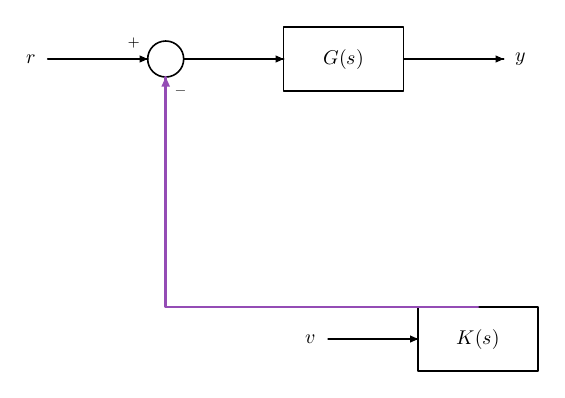
All control Nocti... declarations must be at figure scope, outside axes and noctiksgroup, even if the group retains the identity matrix. Semantic backgrounds are drawn first; generated wires and signs are added after the declarations. Text appears in the upper TeX layer.
Sets and semantic Venn diagrams
These commands describe sets and Boolean operations. The result is a native vector region: an intersection is not simulated by superimposing transparent discs. Two or three circular or axis-aligned elliptical sets are supported.
\begin{noctivenn}[width=300,height=220] ... \end{noctivenn}
\NoctiUniverse[opciones]{esquina inferior izquierda}{ancho,alto}
\NoctiSet[opciones]{nombre semántico}{centro}{etiqueta TeX}
\NoctiShade[opciones]{expresión de conjuntos}
Each Venn figure requires exactly one explicit Universe and two or three Set declarations. It may contain zero to 32 Shade declarations. Forward references are supported: the order of Universe, Set and Shade does not change the selected region. All are declared at figure scope, outside axes and graphics groups.
Universe
| Parameter | Type and unit | Default | Limit / effect | Example |
|---|---|---|---|---|
| Corner | Coordinate, bp | Required | Bottom-left corner of the universe | {10,10} |
| Size | Width,height pair, bp | Required | Positive; the full rectangle must fit within the canvas | {280,200} |
stroke |
Colour | black |
Outline style | stroke=gray |
width |
Number, bp | 0.8 | 0 < width ≤ 100 |
width=1.2 |
dash |
Numeric list separated by : |
Solid | At most eight lengths, each in (0,1000] bp |
dash=4:2 |
opacity |
Number | 1 | 0…1; outline opacity |
opacity=0.8 |
Universe has no built-in name or label. Use NoctiksLabel to label it. It does not accept fill or arrow: its interior is filled through Shade, including selection of the entire universe with a Boolean expression.
Circular and elliptical sets
| Parameter | Type and unit | Default | Limit / effect | Example |
|---|---|---|---|---|
| Name | ASCII identifier | Required | Starts with a letter; followed by letters, digits or _; maximum 32 characters |
{A_1} |
| Centre | Coordinate, bp | Required | The full set must lie within the universe | {115,110} |
| Label | Measured TeX | Required; may be empty | Independent of the name; must fit within the canvas | {$\mathcal{A}$} |
radius |
Number, bp | 50 | Positive; sets both radii; cannot be combined with rx or ry |
radius=60 |
rx |
Number, bp | 50 when omitted | Positive; horizontal radius, not diameter | rx=65 |
ry |
Number, bp | 50 when omitted | Positive; vertical radius, not diameter | ry=45 |
labeldx |
Number, bp | 0 | Label offset from the centre along X | labeldx=-15 |
labeldy |
Number, bp | 0.65*ry |
Label offset from the centre along Y | labeldy=28 |
stroke, width, dash, opacity |
Outline style | Black, 0.8 bp, solid, 1 | Same limits as Universe | stroke=blue,width=1.2 |
Each name is unique and case-sensitive. union,
intersection, difference and complement are reserved. Set names are independent of node names. A label may use text different from the name without changing Boolean expressions.
When specifying only rx=65, ry remains 50; when specifying only ry=45,
rx remains 50. Using radius=60,rx=65 is invalid even if both values are positive. Set outlines do not accept fill or arrow. Ellipse rotation and automatic Euler diagram layout are not supported.
Shading and operations
| Parameter | Type | Default | Limit / effect | Example |
|---|---|---|---|---|
| Expression | Name or functional operation | Required | Maximum 512 bytes; parsing depth 32; existing names | {difference(A,B)} |
fill |
Colour | cyan |
A colour is required; none produces an error |
fill=purple |
opacity |
Number | 0.3 | 0…1; opacity of the entire region |
opacity=0.35 |
Shade accepts only these two style keys. It does not add an outline of its own: the universe and set outlines are drawn after the fills. A Boolean region is composed and filled once, so its own intersection does not darken the opacity. Multiple Shade calls do overlap in order and may accumulate opacity where they coincide.
| Expression | Arity | Selected region | Example case |
|---|---|---|---|
A |
Single name | The entire set A | Simple membership |
union(A,B) |
2 or 3 arguments | Points belonging to at least one argument | Union of two sets |
union(A,B,C) |
3 | Union of all three | Triple union |
intersection(A,B) |
2 or 3 arguments | Points belonging to every argument | Intersection of two sets |
intersection(A,B,C) |
3 | Region common to all three | Triple intersection |
difference(A,B) |
Exactly 2 | A excluding B | Directed difference |
complement(A) |
Exactly 1 | Universe excluding A | Complement relative to the universe |
difference(union(A,B),C) |
Composition | Union of A and B, excluding C | Nested operations |
complement(union(A,B,C)) |
Composition | Outside all three, within the universe | None of the sets |
difference(A,A) |
Exactly 2 | Empty | Valid result with no filled area |
union(A,complement(A)) |
Composition | Entire universe | Selecting the entire background |
The syntax allows spaces and nested operations. It does not accept infix operators (A ∩ B, A|B, A-B) or TeX commands in the expression; TeX is reserved for labels. Difference is directed: difference(A,B) and
difference(B,A) represent different regions.
Two-set example
\begin{noctivenn}[width=300,height=220]
  \NoctiUniverse[stroke=gray,width=1.2,dash=4:2,opacity=0.8]{10,10}{280,200}
  \NoctiSet[radius=60,labeldx=-15,labeldy=28,stroke=blue]{A}{115,110}{$\mathcal{A}$}
  \NoctiSet[radius=60,labeldx=15,labeldy=28,stroke=red]{B}{185,110}{$\mathcal{B}$}
  \NoctiShade[fill=cyan,opacity=0.35]{intersection(A,B)}
  \NoctiksLabel{25,195}{$U$}
\end{noctivenn}
For the simple cases in the table, replace only the Shade expression with A, union(A,B), difference(A,B), complement(A), difference(A,A) or
union(A,complement(A)). This replaces the line; it does not add calls that would darken regions through overlap.
Example with three elliptical sets
\begin{noctivenn}[width=300,height=240]
  \NoctiUniverse{10,10}{280,220}
  \NoctiSet[rx=65,ry=50,labeldx=-24,labeldy=25]{A}{115,145}{$A$}
  \NoctiSet[rx=65,ry=50,labeldx=24,labeldy=25]{B}{185,145}{$B$}
  \NoctiSet[rx=60,ry=48,labeldy=-25]{C}{150,90}{$C$}
  \NoctiShade[fill=purple,opacity=0.3]{difference(union(A,B),C)}
  \NoctiksLabel{25,215}{$U$}
\end{noctivenn}
Replacing the expression with union(A,B,C), intersection(A,B,C) or
complement(union(A,B,C)) shows, respectively, the triple union, the common intersection and the exterior of all three sets. The geometry can represent disjoint, tangent, contained or coincident sets, as well as non-empty intersections. It is not limited to the classic arrangement of three circles.
Drawing order and practical limits
The fixed order is: control group backgrounds, shaded Venn regions, universe and set outlines, then ordinary graphics commands. Labels are placed in the TeX layer. Therefore, a Shade declared last does not cover its own set outlines, whereas an ordinary Rect may cover them. Outlines retain their own opacity.
Boolean composition consumes the figure's point budget. It uses native path operations and numerical graphics precision; exact symbolic boundary arithmetic is not promised. More than three sets, arbitrary shapes as sets and several independent universes in one figure are outside this API's scope. Create separate figures for independent universes.
Common diagram composition errors
| Situation | Result / correction |
|---|---|
Using 20pt or 2cm as a coordinate |
Coordinates require numbers in bp; convert the value and write the number |
| Using constants or TeX macros for node positions | These fields do not pass through the constant evaluator; use literals |
NoctiksEllipse{100,80}{30,20} expecting a centre |
100,80 is a corner; for centre (100,80), use corner (85,70) |
Adding [stroke=blue] to Connect and losing the arrow |
Add arrow=end in the same explicit list |
| Using two relations in NodeRelative | Keep one; apply shiftx/shifty if an adjustment is needed |
Adding bend to route=hv |
bend applies only to hvh or vhv |
Adding clearance to route=straight |
Use a side detour or remove the key |
| Signal label outside the canvas | Enlarge the canvas or adjust side, fraction and offsets |
| Control node outside Chain/via | Include it in exactly one of these layouts |
Sum receives two inputs at south |
Choose another port or correct the duplicate connection |
| Branch between non-neighbouring nodes | Choose the actual wire between neighbouring Chain nodes |
Branch or label on a wire with gap=0 |
Give the wire a positive length |
| Blocks via do not fit | Increase horizontal space; gaps of at least 12 bp are required |
| Group outside the canvas | Account for the title, padding and half the border stroke width, as well as the nodes |
Set with radius and rx together |
Choose a circle with radius or an ellipse with rx/ry |
Shade with fill=none |
Use a colour, or remove Shade if no fill is wanted |
| Two universes in one figure | Create two figures; each Venn accepts one |
Command and environment index
Look up commands by name. Their arguments, options, defaults and examples are in the linked section.
| Environment | Purpose |
|---|---|
noctikspicture |
Geometric drawing: canvases, coordinates and primitives |
noctiksgroup |
Graphics groups, transformations and clipping |
noctiaxis |
Axes and plotting area |
noctipanels |
Panels and scientific composition |
noctipanel |
Panels and scientific composition |
nocticontrol |
Control diagrams: blocks, chains and feedback |
noctivenn |
Sets and semantic Venn diagrams |
Diagnostics, errors and operational limits
Non-fatal diagnostics describe drawing decisions; they do not constitute mathematical or visual acceptance of the result. Errors invalidate generation. Use the figure indicated in the diagnostic to locate the problem.
| Situation | Result | Practical action |
|---|---|---|
| Undefined curve samples | Segments are separated; diagnostic | Review the domain, singularities and sampling |
| Unresolved adaptive intervals | Curve connection is interrupted; diagnostic | Increase the budget or adjust tolerance and domain |
| Suspected discontinuity | The curve is split; diagnostic | Review the plot and analytical behaviour |
| Origin outside the range or logarithmic scale | The axes cross at a valid edge; diagnostic | Set axes and limits appropriate to the intended figure |
| Point, reference line or region outside the range | The item is omitted; diagnostic | Adjust the coordinate or explicit range |
| Zero-length segment/vector | Omitted; diagnostic | Correct points or components |
| Point labels without a free position | Text is retained; collision diagnostic | Change the side/offsets or enlarge the plot |
| Contour line without room for its label | That label is omitted; diagnostic | Reduce labels or enlarge the plot |
| Scalar cells without enough valid corners | Masked; diagnostic | Review data and gaps |
| Undefined vector field or zero vector | Affected arrows are omitted; diagnostic | Review equations and domain |
| Trajectory stopped early | The calculated portion is retained; diagnostic with the reason | Review the step, seed and field |
| Band without overlap or with undefined intervals | Areas without data are omitted; diagnostic | Review the shared domain and gaps |
| Unknown, duplicate or malformed option | Error | Use each documented key only once |
| Missing file, unsafe path or invalid CSV | Error | Correct the resource, path or format |
| Non-finite, out-of-range or log-incompatible value | Error in explicit data/configuration | Correct the value and scale |
| Unknown constant, cycle or duplicate | Error | Correct the definition or scope |
| Incomplete scene or improperly closed structure | Error | Review compilation and environment closures |
| Complexity limit exceeded | Error | Reduce complexity or split the figure |
Compilation applies specific limits: a canvas of up to 2000 × 2000 bp; 32 levels of graphics groups; expressions of 2048 bytes and 256 nodes; 64 dependency levels; 128 columns and 8192 bytes per table field. Scientific and semantic families have further maxima, listed alongside their parameters. If a figure exceeds the limits, reduce its complexity or split the composition.
Formulae accept the mathematical expressions described in this manual; they do not execute code or system commands. It does not require shell-escape. Its scope is 2D: it does not provide statistical fitting, symbolic calculation, control simulation, 3D, animation or general automatic graph layout. Use a version of Paper Studio that includes the features you use.